


Low priced gaming laptops cover a lot of ground, from school-friendly machines with enough muscle for lighter games to stronger 15.6-inch picks that handle everyday work and after-hours play. You’re usually trading premium finish and top-end graphics for better storage, more memory, or a fuller keyboard layout, so the real question is fit, not hype.
This roundup focuses on that trade-off. You’ll see which models make sense for commuters, students, home desks, and casual gaming setups, plus where each one asks you to accept a smaller screen, older processor, or slimmer memory headroom.
Quick Shortlist for Low Priced Gaming Laptops

Dell Latitude 3190 11.6" HD 2-in-1 Touchscreen Laptop

NIAKUN Laptop Computer 15.6 Inch Windows 11 Pro

KAIGERR Gaming Laptop 1TB NVMe SSD 16GB RAM
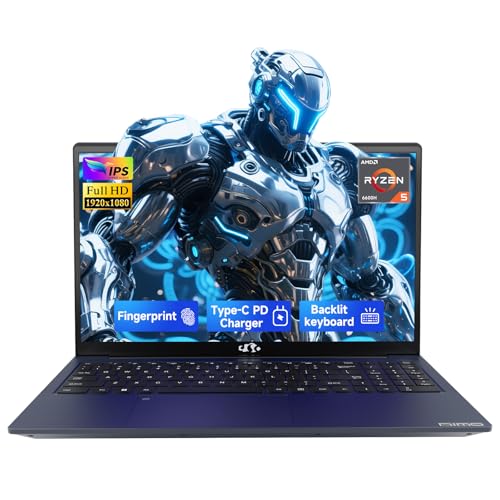
NIMO 15.6" IPS FHD-Light Gaming-Laptop, AMD Ryzen 5 6600H

Lenovo 15 Gaming Laptop, AMD Ryzen 5 7535HS

NIMO 15.6" IPS FHD-Light Gaming-Laptop, AMD Ryzen 5 6600H
Light Gaming Laptop, AMD Ryzen 7 5700U

Gaming laptop Core processor 15.6 Inch FHD Display
More Details On Our Top Picks
This Latitude fits a very specific lane, a small-screen machine for travel bags, kitchen counters, and quick desk work. The 2-in-1 hinge and touch display make it easier to use in tight spaces than a clamshell design, though the 11.6-inch panel and 1366 x 768 resolution keep it firmly in utility territory.
With 4GB of memory and a 128GB solid-state drive, it suits lighter app loads, document work, and storage that stays under control. Compared with the larger NIAKUN and Lenovo picks, this one gives you portability first, and the Renewed label makes it a practical route for shoppers who care more about fit than polish.
Strong Points
- Touchscreen input makes basic navigation faster in cramped setups.
- 2-in-1 design gives you tablet-style flexibility for note taking or casual media.
- 128GB SSD helps the system feel quicker than older hard-drive machines.
- Compact body slips into bags that would struggle with a 15.6-inch chassis.
Things To Consider
- 4GB RAM is tight for heavier multitasking or larger game installs.
- The smaller HD panel is fine for basics, but not ideal for long game sessions.
- Renewed hardware can vary in cosmetic wear, so expectations should stay practical.
Feature Snapshot
Who It Suits Best
Travelers, students, and casual users who want a very small Windows machine with touchscreen convenience will get the most from it.
Where A Sibling Pick Shines
NIAKUN Laptop Computer 15.6 Inch Windows 11 Pro suits shoppers who want more screen space and stronger multitasking room.
This NIAKUN leans into capacity, not flash. The 15.6-inch layout gives you a much easier viewing area than the Dell Latitude 3190, and the 16GB RAM plus 512GB SSD combo is the kind of setup that keeps a lot of browser tabs, office files, and casual game installs from crowding each other.
The Core i7-7600U is an older chip, so the honest read is that you’re buying usable headroom rather than modern flagship speed. For school, business tasks, and general home use, that balance can make sense, especially with the backlit keyboard helping in dim rooms.
Highlights
- 16GB memory gives you far more breathing room than entry-level 4GB machines.
- 512GB SSD leaves practical space for documents, media, and several programs.
- Backlit keyboard helps late-night work in dorms, offices, or shared spaces.
- 15.6-inch screen is easier on the eyes than the smaller Dell option.
Points To Note
- The processor is older, so newer, heavier games still deserve modest expectations.
- Office 365 mention on the listing points to a setup perk, not a hardware advantage.
- Larger footprint makes it less handy for the tightest bags and smallest desks.
Who Will Love This
Students and office users who want a roomy screen, fuller storage, and easy everyday multitasking will get the cleanest fit here.
Another Choice May Suit
Lenovo 15 Gaming Laptop, AMD Ryzen 5 7535HS is the better route for shoppers who want a more modern processor in a lighter package.
The KAIGERR shifts the conversation toward speed and headroom. Compared with the NIAKUN and Dell entries, it gives you a much more ambitious spec mix, starting with a Ryzen 7 5825U, 16GB RAM, and a 1TB NVMe SSD, which is a lot of room for games, projects, and large media files.
That NVMe storage is a solid-state drive using a faster connection path than older SATA-style drives, so file loading and system response should feel snappier in everyday use. The Radeon RX Vega 8 graphics are integrated rather than discrete, though, so you get a sensible all-rounder rather than a dedicated gaming monster.
Upsides
- 1TB SSD gives you unusually roomy storage for the class.
- Ryzen 7 5825U and 16GB RAM suit busy multitasking days.
- WiFi 6 is helpful in crowded apartments, campuses, and offices.
- 15.6-inch format stays more usable than small-screen travel models.
- Good fit for editing, schoolwork, and light creative projects.
Small Caveats
- Integrated graphics keep expectations grounded for demanding modern titles.
- The listing leans hard on storage and CPU, so display details matter less here.
Core Details
Right Fit For
Shoppers who care about storage space and steady all-purpose performance more than flashy design will find the strongest value here.
Look Elsewhere When
NIMO 15.6" IPS FHD-Light Gaming-Laptop, AMD Ryzen 5 6600H suits you better when you want newer platform features and a more tuned gaming-first layout.
This NIMO sits in a useful middle ground, and that matters in low priced gaming laptops more than glossy branding does. A 15.6-inch IPS panel, meaning in-plane switching for wider viewing angles, pairs well with the Ryzen 5 6600H, so you’re not stuck with a tiny screen or a weak-feeling everyday setup.
The source also points to DDR5 memory, which is the newer memory standard, and that gives the machine a cleaner path for multitasking than older DDR4-based budget picks. For most dorm rooms and home desks, it feels like the sort of machine that can handle work during the day and lighter gaming after hours without asking for much fuss.
Bright Spots
- IPS display should give you steadier viewing from off-angle seating.
- Ryzen 5 6600H is a stronger fit than basic low-power chips.
- DDR5 memory supports more responsive multitasking.
- 15.6-inch size hits a comfortable middle point for desk use and portability.
Areas To Watch
- The listing stays light on extras, so you’re mostly paying for core performance.
- Like many budget gaming machines, heat and fan noise can become part of daily ownership.
At A Glance
Best Suited To
Home users and students who want a more modern-feeling budget laptop with a proper 15.6-inch display will get the most out of it.
Swap It Out When
KAIGERR Gaming Laptop 1TB NVMe SSD 16GB RAM makes more sense for shoppers who want a larger storage pool and stronger headline specs.
The Lenovo 15 lands in a familiar sweet spot: enough processor muscle for ordinary gaming and school work, without pushing into bulky territory. Compared with the NIMO entries, it feels a little more restrained on paper, but that can suit commuters who care more about carrying a laptop than showing off a spec sheet.
The 8GB DDR5 memory and 256GB PCIe SSD keep the focus on essentials. PCIe refers to the high-speed connection between the SSD and the rest of the system, so your app launches and file access stay more responsive than on older storage designs.
Reasons To Buy
- Ryzen 5 7535HS gives the laptop a newer, more capable core than older budget chips.
- DDR5 memory helps the system stay responsive during everyday multitasking.
- 256GB SSD keeps the footprint manageable for a carry-everywhere machine.
- Lenovo’s 15-inch class usually suits mixed work and play well.
Room For Improvement
- 8GB RAM is workable, but it leaves less breathing room than 16GB options.
- 256GB storage can fill quickly once game installs get larger.
- It makes sense for balanced use, not for shoppers who want the biggest spec sheet.
Perfect Match For
Commuters and students who want a mainstream 15-inch laptop with modern enough internals for everyday gaming should feel at home here.
A Better Fit Elsewhere
NIAKUN Laptop Computer 15.6 Inch Windows 11 Pro suits you better when extra memory and storage matter more than keeping the setup modest.
This NIMO version stacks several practical extras on top of the 6600H platform. You get the same 15.6-inch IPS FHD foundation as the earlier NIMO pick, but the addition of 16GB DDR5, a 256GB SSD, a fingerprint reader, and a 100W Type-C port makes it feel better suited to a busy desk than a bare-bones gaming machine.
That fingerprint reader is a simple convenience feature, and the Type-C charging support broadens how you can power the laptop, depending on the rest of your gear. The trade-off is that the storage remains mid-sized, so game libraries still need some discipline unless you keep larger files elsewhere.
Best Bits
- 16GB DDR5 is a strong fit for heavier multitasking.
- Fingerprint login adds quick access without extra fuss.
- 100W Type-C support can simplify charging arrangements.
- IPS FHD display works well for shared viewing and long work sessions.
- Good step up from the more stripped-down Lenovo 15.
Softer Spots
- 256GB storage is fine for essentials, but larger game collections need planning.
- Extra features help, though they don’t replace dedicated graphics power.
- Smudges and fingerprints may show more easily on a touch-heavy daily-use machine.
Technical Sheet
Who Should Grab It
Shoppers who want a more feature-heavy budget laptop for work, light gaming, and day-to-day convenience should look here first.
Where Shoppers Go Wrong
KAIGERR Light Gaming Laptop, AMD Ryzen 7 5700U suits you better if storage space matters more than extras like biometric sign-in.
This KAIGERR option keeps the formula straightforward: Ryzen 7 5700U, 16GB RAM, and 512GB SSD. Compared with the Lenovo 15, it gives you more storage headroom right away, while the stronger memory pool makes it a steadier companion for lots of tabs, coursework, and lighter creative work.
The Ryzen 7 5700U is a mobile-class processor, so it suits everyday performance rather than high-end gaming bragging rights. For most home offices and shared family spaces, that’s a fair trade, especially since the larger SSD reduces how often you have to manage files.
Plus Points
- 512GB SSD gives you room for a sensible game and app library.
- 16GB RAM supports smoother multitasking than 8GB entry models.
- Ryzen 7 platform gives the machine a stronger core than basic low-power chips.
- Works well for mixed home, school, and light work use.
Minor Gripes
- The listing keeps graphics details light, so gaming expectations should stay measured.
- Brand naming is a little generic, which can make model comparison less tidy.
Whose Shelf It Belongs On
Budget-minded multitaskers who want a roomy SSD and a solid memory cushion will get the clearest value from it.
Skip It When
KAIGERR Gaming Laptop 1TB NVMe SSD 16GB RAM is the better fit when you want even more storage and a stronger overall spec list.
YOZISUAN keeps this one very plain, and that can be a strength for shoppers who want a straightforward machine for work and light play. The 15.6-inch FHD panel gives you a standard full-HD workspace, which is easier to live with than the tiny Dell Latitude screen and more conventional for long typing sessions.
With 16GB RAM, 512GB SSD storage, WiFi, and Bluetooth 5.0, it looks built for ordinary daily movement between home, class, and office. The core processor reaches up to 3.40GHz, so this is better thought of as a practical everyday laptop with gaming-leaning branding than a flashy play machine.
Standout Traits
- 16GB RAM gives you a comfortable baseline for multitasking.
- 512GB SSD helps keep files and apps in a manageable zone.
- 15.6-inch FHD screen suits long sessions of typing, browsing, and streaming.
- WiFi and Bluetooth 5.0 cover the usual wireless essentials cleanly.
Honest Caveats
- The listing stays vague on the exact processor family, so comparison shopping takes a little care.
- It sounds more like a general-use laptop than a graphics-heavy gaming rig.
- Brand details are spare, which may matter for shoppers who like clearer model naming.
Details At A Glance
The Right Fit
Students, commuters, and business professionals who want a balanced, non-fussy laptop for day-to-day use should find it easy to live with.
Reach For A Different Pick When
KAIGERR Gaming Laptop 1TB NVMe SSD 16GB RAM suits you better if you want a clearer performance focus and more ambitious storage.
What Matters Most Before You Choose
Display And Size
Screen size changes the whole feel of a budget gaming laptop. An 11.6-inch model like the Dell Latitude 3190 travels easily, while 15.6-inch machines from NIAKUN, KAIGERR, NIMO, Lenovo, and YOZISUAN give you a more natural gaming and multitasking view.
Memory And Storage
RAM decides how many tasks stay open comfortably, and SSD size decides how quickly your storage fills. In this category, 16GB and 512GB usually feel far more relaxed than 4GB and 128GB, especially once game installs and school files start piling up.
Processor Tier
A newer or stronger chip helps a laptop feel less strained during daily use. Ryzen 5 and Ryzen 7 options in this roundup give you a better baseline than older low-power processors, though the best fit still depends on whether you want portability, storage, or a more modern platform.
Extras Worth Paying For
Backlit keyboards, fingerprint readers, Type-C charging, and WiFi 6 are quality-of-life upgrades, not raw power boosts. They matter most for commuters, shared workspaces, and anyone who wants a laptop that feels easier to live with after the first day.
Two Things That Separate Better Budget Models
Common Shopping Slip Ups
It’s easy to focus only on the processor name and miss the memory and storage limits. A strong chip with too little RAM or a tiny SSD can still feel cramped fast.
What The Higher Tier Buys
More money usually goes into larger SSDs, newer memory, better screens, and a cleaner mix of convenience features. That upgrade makes sense when you keep lots of files, work across several apps, or want a laptop that feels less compromised from day one.
Frequently Asked Questions
Can low priced gaming laptops handle modern games?
They can handle lighter games and some older titles with much less drama. More demanding releases usually call for lower settings and realistic expectations.
How much RAM should you look for?
16GB is the comfortable target in this category. 8GB works for basics, but it fills up faster once browsers, launchers, and background apps pile in.
Is a bigger SSD worth it?
Yes, especially since game files are large and storage fills quickly. A 512GB drive gives you far more breathing room than 128GB or 256GB.
Are 15.6-inch models better than smaller ones?
For most people, yes, because the extra screen space makes games, spreadsheets, and streaming easier to manage. Smaller models still make sense for travel-first use.
Should you choose newer memory over an older processor?
Usually, a balanced mix matters more than one strong spec alone. A newer memory standard and enough storage can make everyday use feel smoother than an older chip paired with weak capacity.
