


Whether you’re on back-to-back video calls or just trying to focus in a shared workspace, the right headset changes how your day feels. This list covers wired and wireless options for home offices, call centers, and hybrid schedules. Each pick suits a different setup, so match the profile to yours before deciding.
How The Shortlist Stacks Up

Amazon Basics On-Ear Wired Computer Headset
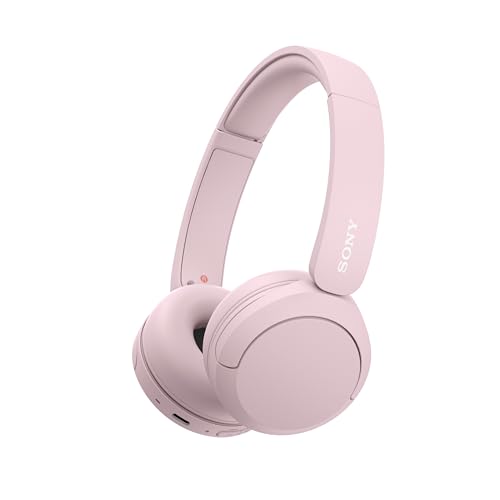
Sony WH-CH520 Wireless On-Ear Headphones (Pink)

Sony WH-CH520 Wireless On-Ear Headphones (White)

Sony WH-CH520 Wireless On-Ear Headphones (Butter Yellow)

Mopchnic Wireless Headset with Charging Base

JIAMQISHI USB Headset with Mic (Apricot)

JIAMQISHI USB Headset with Mic (White)

Soothielec Wireless Work Headset

Jabra Evolve 20 (2025 Edition) Single-Ear Headset
Jabra Evolve 20 Wired Headset (Teams Certified)
More Details On Our Top Picks
This is the headset you keep in a drawer for the day your main pair dies. It connects through either a 3.5mm port or an inline control with USB-A, folds flat for storage, and carries an adjustable boom mic sized for small to medium heads.
The compact on-ear fit can feel snug at first; most owners suggest easing into it over the first week or two of regular wear. For occasional calls and meetings, that break-in period is a fair trade.
What Helps Most
- Dual connectivity: plug into any laptop’s headphone jack or a USB-A port without adapters
- Foldable frame slips into a laptop bag or desk drawer easily
- Adjustable mic positions close to your mouth for clearer voice pickup
- Costs little enough to keep as a backup or loaner for guests
Things To Consider
- On-ear pressure may bother some users during long sessions; short breaks help
- Wired only, so no roaming away from the desk mid-call
Key Specs
Who It Suits Best
Students, guest-room desks, and anyone who wants a cheap wired spare that still sounds clear on calls.
A Better Fit Elsewhere
Anyone needing noise filtering should look at the Mopchnic Wireless Headset instead, since its ENC mic handles loud rooms far better.
Sony’s CH520 line is built around one promise: charge it rarely. The battery runs up to 50 hours per charge, and a quick three-minute top-up buys roughly 1.5 hours of playback when you’re running late. A USB Type-C cable comes in the box.
The pink finish adds personality to an otherwise understated on-ear design. In our view, this is the version to grab if you want a work-and-music hybrid you can wear from morning standup through an evening playlist without hunting for a charger.
Notable Upsides
- Up to 50 hours of battery means multi-day use between charges
- Three-minute quick charge delivers about 90 minutes of listening
- Built-in microphone handles calls without swapping devices
- USB-C charging matches the cable already on your desk
Worth Noting
- On-ear pads sit against the ear rather than around it, which some find fatiguing over very long stretches
- No active noise cancellation, so open offices stay audible
The Right Fit
Remote workers and students who split their day between calls, lectures, and music on one device.
Swap It Out When
If your priority is muting a chaotic household during meetings, the Soothielec Wireless Work Headset offers dedicated mute hardware this Sony lacks.
Same internals as the pink model above, different wardrobe. The white finish reads clean and neutral, which suits commuters who’d rather their headphones blend into a work bag than shout about themselves.
Everything practical carries over: roughly 50 hours per charge, a fast three-minute boost for about 1.5 hours more, USB-C charging, and a microphone ready for hands-free calls. On long-haul flights or train commutes, that endurance is the whole point; you can leave the charger at home for a week-long trip and still land with power left.
Useful Touches
- Multi-day battery life removes charging anxiety on trips
- Quick-charge rescue for forgotten-charger mornings
- Neutral white colorway pairs well with office attire
- Wireless pairing keeps pockets and bags cable-free
Small Caveats
- White surfaces tend to show scuffs and makeup transfer over time; a soft cloth wipe-down keeps them tidy
- On-ear seal lets cabin and street noise through
Made For
Frequent travelers and commuters who value battery stamina and a low-key look over noise isolation.
Reach For A Different Pick When
Desk-bound workers who never leave the house may prefer the wired JIAMQISHI USB Headset, which skips charging entirely.
The butter yellow variant is the CH520 for people who think desk gear should be fun. Underneath the cheerful shell it’s identical to its siblings: up to 50 hours of playback, a three-minute charge worth about 1.5 hours, USB-C input, and a call-ready microphone.
You give up nothing functionally by choosing the brighter shade. The honest trade-off is purely aesthetic maintenance: light-colored plastics show grime faster than black ones, so plan on an occasional wipe if you handle them with snack-dusted fingers.
Everyday Wins
- Standout colorway that brightens a plain workstation
- Endurance rated around 50 hours per full charge
- Fast top-up covers a commute’s worth of audio quickly
- Microphone supports calls straight from the headset
Points To Note
- Light plastic shows fingerprints and dust more readily than darker finishes
- Identical sound signature to the other CH520 colors, so no acoustic reason to switch
Feature Rundown
Who Will Love This
Creative professionals and students who want reliable wireless audio with a bit of personality on camera.
Consider Something Else When
Anyone after maximum discretion on client calls will likely prefer the black Jabra Evolve 20, which looks every inch the corporate tool.
This Mopchnic is purpose-built for people whose job is the call. It ships with a USB dongle for a stable computer connection, a dedicated charging base so the headset always has a home, and an independent mute button you can hit instantly when privacy matters.
The microphone uses environmental noise cancellation, meaning onboard processing filters ambient sound before your voice reaches the caller. In a busy office or a household with kids and pets, owners commonly report callers notice the difference. The dongle route also sidesteps the flaky Bluetooth pairing some laptops inflict.
The Good Stuff
- ENC mic suppresses background chatter before it reaches callers
- Charging base doubles as a desk stand, so the headset never goes missing
- One-touch mute gives instant privacy during calls
- USB dongle connection tends to hold steadier than generic Bluetooth on desktop PCs
Honest Caveats
- The base occupies desk space smaller setups may not have
- On-ear design leaks some audio outward in quiet rooms
- Mute behavior can vary by conferencing app, so test your workflow first
Whose Shelf It Belongs On
Call center agents, recruiters, and support staff who live on the phone all shift.
Another Choice May Suit
Music lovers who care more about listening quality than call features will get more joy from the Sony WH-CH520.
A unidirectional boom mic sits at the heart of this JIAMQISHI. Unidirectional means it listens mainly from one direction, so your voice dominates while keyboard clatter and room echo fade out. The arm rotates 270 degrees, letting you wear it on either side.
Connectivity covers both worlds: USB for computers and a 3.5mm plug for phones or tablets, with inline volume and call controls on the cable. The adjustable headband accommodates adults and kids alike, which makes this a sensible shared-household headset for online classes.
A Few Highlights
- Dual USB and 3.5mm plugs cover laptops, desktops, and mobile devices
- 270-degree rotating boom works for left- or right-side wearing
- Inline controls adjust volume without touching the screen
- Headband sizing fits both adult and younger heads comfortably
Room For Improvement
- Wired tether limits movement compared with the wireless picks here
- Boom arm needs gentle handling; yanking it can stress the joint over time
Right Fit For
Students and parents setting up a dependable headset for remote classes and homework calls.
Where A Sibling Pick Shines
Shoppers wanting a lighter visual footprint will like the white JIAMQISHI variant below; the specs are the same.
Functionally a twin of the apricot model above, this white JIAMQISHI exists for one reason: aesthetics. Against a white desk or a pastel setup, it disappears pleasantly where the apricot version pops.
You still get the 270-degree unidirectional boom mic, the dual USB-plus-3.5mm connection, inline call controls, and an adjustable band sized for grown-ups and children. Nothing about the performance changes, so choose purely on which color suits your space.
What Makes Sense
- Identical feature set to the apricot variant, including the flexible boom
- Clean white finish suits minimal and shared workspaces
- Plug-and-play setup with no software or drivers to fuss over
Less Ideal Details
- White cable and cups collect visible grime faster than dark versions
- No wireless option; the cord dictates where you sit
Built With In Mind
Minimalist home-office workers and teens furnishing a study corner with matching gear.
Look Elsewhere When
Anyone taking calls in a genuinely loud room should step up to the Mopchnic Wireless Headset, whose ENC processing filters more aggressively.
The Soothielec targets a very specific pain point: taking professional calls while a dog barks or kids argue two rooms away. Its environmental noise cancelling microphone filters most of that chaos out, and a one-touch mute button silences your side instantly during Zoom or Teams meetings.
One detail matters here: the mute function operates through the headset itself rather than syncing with every app natively, so it’s worth confirming behavior with your usual platform. Compared with the Sony CH520 picks earlier in this list, this one trades music polish for call discipline, and for many home workers that’s the right trade.
The Helpful Details
- ENC mic blocks pets, children, and household noise effectively
- Dedicated mute button responds faster than fumbling for an on-screen toggle
- Wireless design lets you pace, stretch, or grab coffee mid-call
- Tuned specifically for speech clarity rather than bass-heavy music
Factors To Weigh
- Mute integration varies by conferencing platform; verify before important meetings
- Music listeners may find the tuning flat compared with consumer headphones
Best Suited To
Parents working from noisy homes, tutors, and anyone whose calendar is wall-to-wall video meetings.
Where Another Pick Suits Better
Those prioritizing battery marathon sessions for travel will prefer the Sony WH-CH520 White and its 50-hour rating.
Monaural headsets like this Evolve 20 cover one ear deliberately. Receptionists, warehouse coordinators, and front-desk staff need to hear colleagues walking up mid-call, and blocking an ear would be a liability rather than a luxury.
Jabra backs the single speaker with a noise-cancelling microphone and physical call-control buttons, connected via USB-C or USB-A depending on your machine. The lightweight frame is designed for shifts measured in hours, not minutes. Unlike the budget Amazon Basics unit at number one, this feels engineered for eight-hour days, and the build reflects that intent.
Points In Its Favor
- Single-ear layout keeps you aware of your surroundings on duty
- Noise-cancelling mic keeps conversations crisp in busy offices
- On-cable call controls answer and end without reaching for the mouse
- Both USB-C and USB-A connections cover new and older PCs
Trade Offs To Consider
- One speaker means no stereo experience for music or media
- Wired design ties you to the desk throughout the call
Who Should Grab It
Receptionists, retail phone staff, and support teams working shared or public-facing spaces.
Skip It When
Immersive listening matters more than situational awareness; the Sony WH-CH520 delivers proper stereo sound instead.
This is the sibling of the Evolve 20 above with one meaningful addition: Microsoft Teams certification. That label means Microsoft has verified the headset integrates cleanly with Teams, so the call-control buttons behave predictably instead of requiring manual configuration.
For IT departments standardizing equipment across a company, that certification simplifies rollout considerably. Everyone else gets the same strengths as the non-certified version: a single-ear design for staying aware, a noise-cancelling mic, USB-C/A connectivity, and comfortable all-day weight. The premium over the plain model buys administrative peace of mind more than audible difference.
Notable Gains
- Teams certification ensures smooth, predictable integration
- Physical call controls reduce fumbling during meetings
- Single-ear awareness suits open-plan and customer-facing roles
- Flexible USB-C/A plug fits mixed hardware fleets
A Few Limitations
- Certification premium pays off mainly for Teams-centric workplaces
- Monaural audio won’t satisfy anyone using these for music breaks
Quick Technical Notes
Perfect Match For
Corporate IT buyers and Teams-heavy organizations equipping staff with standardized, predictable hardware.
Not Your Match When
Solo home workers outside the Teams ecosystem save money with the non-certified Jabra Evolve 20 at number nine, which performs identically otherwise.
What Matters Most Before Choosing Office Headphones
Match The Connection To Your Desk
Wired headsets never run out of power and pair instantly, but they anchor you to one spot. Wireless models free you to move, yet they add charging to your routine. Count how far you roam during calls before committing either way.
Also check your computer’s ports. Older towers want USB-A or a 3.5mm jack; newer laptops lean USB-C. Dual-plug designs like the JIAMQISHI sidestep the problem entirely.
Decide How Much Noise You Need To Fight
Noise cancelling microphones filter what callers hear; noise isolating earcups affect what you hear. Busy households and open offices usually need the former most, since a distracted caller derails a meeting faster than a distracted listener.
Weigh Comfort For Real Shift Lengths
On-ear pads press against the ear and suit shorter sessions; anything beyond four or five hours daily rewards lighter frames and softer padding. Single-ear designs distribute pressure differently and often feel cooler in warm rooms.
Think About Platform Fit
Certified-for-Teams hardware behaves predictably inside that ecosystem, which matters for company-wide rollouts. Individual users can usually skip the premium and configure manually.
Key Considerations Across These Picks
Pitfalls Shoppers Hit
The most common mistake is buying consumer headphones for call-heavy work, then discovering the mic disappoints everyone on the other end. Another trap: ignoring mute behavior, which varies between headset hardware and conferencing apps. Confirm both before your first big meeting.
The Case For Spending Up
Higher-tier models buy certified integrations, sturdier materials, and microphones tuned for speech rather than music. Call-center professionals and corporate fleets feel that difference daily; casual users making two calls a week rarely do.
Frequently Asked Questions
Are wired or wireless headsets better for office work?
Wired units offer zero-latency audio and never need charging, which suits fixed desks. Wireless wins for people who move around, take calls standing, or share one headset across devices.
Do I need noise cancelling for video calls?
It depends mostly on your environment rather than the technology. Quiet homes manage fine without it, while shared spaces and pet-filled houses benefit noticeably from an ENC microphone.
How long should office headset batteries last?
Anything above 20 hours covers a full workweek of typical use. Models like the Sony WH-CH520 push toward 50 hours, which suits travelers especially well.
What does a unidirectional microphone actually mean?
It captures sound primarily from one direction, usually the side facing your mouth. That focus reduces keyboard noise and room echo reaching your callers.
Is a single-ear headset a downgrade from stereo?
Not for its intended job. Monaural designs let you hear coworkers and customers simultaneously, which reception and support roles genuinely require.
Wrap Up
Your ideal headset depends less on specs and more on your actual day. Heavy callers should prioritize mic quality and mute controls; music-and-meeting hybrids will love the Sony WH-CH520 family; desk-bound staff on a budget have solid options under every price ceiling here. Match the pick to your routine, and the rest falls into place naturally.
