


Open-plan offices, barking dogs, clattering keyboards: background noise is the enemy of every work call. A good noise-cancelling microphone headset fixes that at the source, filtering your voice so colleagues hear you and not your surroundings. This list covers wired and wireless options across a range of budgets, from plug-and-play basics to Teams-ready business gear, so you can match one to your desk, your platform, and your patience level.
A Snapshot Of The Selections
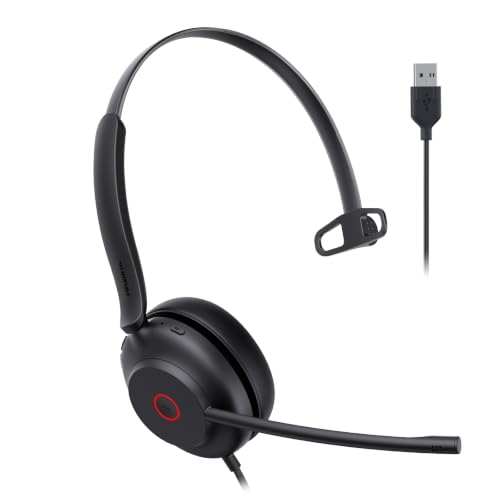
Yealink UH35 Wired Headset (USB-A)

Logitech Zone Wired Noise Cancelling Headset

Poly Blackwire 5220 Wired Headset

Logitech H390 Wired Headset (Off-White)

Logitech H390 Wired Headset (Rose)

Logitech H391 Wired Headset (Graphite)

Mopchnic Wireless Bluetooth Headset with Charging Base

Yealink BH71 Pro Bluetooth Headset

Soothielec Wireless Headset with Mic for Work
Surpixo Dual-Mode Wireless Headset
More On The Choices That Made The List
The UH35 keeps things refreshingly simple: one ear cup, a USB-A plug, and an AI-driven dual-microphone system that does the heavy lifting on call clarity. At roughly 3.4 ounces, you may forget it’s on during a long afternoon of meetings, which is exactly what most people want from a daily driver.
The boom arm rotates a full 300 degrees, so switching ears or parking the mic out of the way takes half a second. Foam cushions provide passive isolation without the clamp of over-ear designs, a nice fit for shared desks and quick call-and-go routines.
What Works In Its Favor
- AI noise cancellation filters office chatter before it reaches callers
- Under 4 ounces means less neck fatigue across back-to-back meetings
- 300° boom mic swings to either side or tucks away when not talking
- HD audio tuned for voice-first platforms like Teams and Zoom
Things To Consider
- On-ear foam pads collect skin oils over time and need occasional wiping
- USB-A only, so newer port-less laptops require an adapter
Right Fit For
Routine callers who want a light, no-fuss wired headset that stays comfortable through a full shift.
A Better Fit Elsewhere
Shoppers needing stereo music quality alongside calls should look at the Logitech Zone Wired instead.
Where the Yealink UH35 leans lightweight, the Zone Wired leans corporate polish. It’s certified for Microsoft Teams, carries an inline controller with a dedicated meeting button, and works with Logitech Sync software so IT teams can manage fleets of them remotely. In a busy open office, that combination matters more than any single spec.
The dual-mic array is designed to separate your voice from surrounding acoustic clutter, and the 40mm drivers give calls and music noticeably fuller bass than budget headsets. Compared to the H390 later on this list, this is the step up you feel within the first call.
The Upside
- Teams certification means one-touch meeting joins without fiddling
- 40mm drivers deliver richer sound for both calls and music breaks
- Dual-mic noise cancellation built specifically for open-office din
- Sync software support simplifies deployment across a whole team
- Inline controls keep volume and mute within thumb reach
Small Caveats
- Over-ear design runs warmer than lighter on-ear picks during long sessions
- Business-grade pricing sits above casual-use alternatives here
At A Glance
Who It Suits Best
Corporate employees and hybrid workers whose day lives inside Microsoft Teams.
Where A Sibling Pick Shines
Solo remote workers on a tighter budget will get everything they need from the Logitech H390 below.
The Blackwire 5220 answers a question the other wired picks don’t: what happens when your devices don’t agree on ports? Poly includes USB-C, USB-A, and a 3.5mm jack, so the same headset moves between a modern laptop, an older desktop, and even a phone without adapters scattered across your desk.
Poly (formerly Plantronics) has decades of contact-center pedigree, and it shows in the ergonomic over-ear fit meant for all-day wear. The flexible boom positions the noise-cancelling mic close to your mouth, and compatibility spans Teams, Zoom, Mac, and PC alike.
The Case For It
- Three connection types cover nearly every device you own
- Ergonomic over-ear padding designed for extended wear
- Noise-cancelling boom mic keeps voices clear on conference calls
- Broad platform support across Teams, Zoom, Mac, and Windows
Points To Note
- Three cable options add slight clutter compared to single-plug rivals
- Over-ear cups can feel snug on larger heads until broken in
Feature Snapshot
Made For
Jugglers of multiple devices: consultants and hybrid staff who bounce between laptop, desktop, and mobile.
Swap It Out When
Wireless freedom is the priority, in which case the Yealink BH71 Pro further down fits better.
Few headsets have been recommended to first-time remote workers as often as the H390. Plug it into a USB-A port, wait two seconds, and it just works; no software, no pairing, no settings menu spelunking. The off-white finish gives it a softer look than typical black office gear.
A rigid left-side boom swings down for calls and tucks up when you’re listening to music, and inline buttons handle volume and mute mid-conversation. Fine-tuned digital drivers make meeting audio crisp enough that most users won’t miss pricier hardware.
A Strong Showing
- True plug-and-play setup with zero configuration steps
- Tuck-away mic boom doubles as a regular listening headset
- Inline volume and mute controls avoid interrupting active calls
- Gentle price point makes it easy to equip a spare desk
Less Ideal Details
- USB-A connector skips newer USB-C-only laptops
- Plastic build feels serviceable rather than premium
- Passive isolation is modest in genuinely loud rooms
Built With In Mind
Students, occasional callers, and anyone setting up a first home workstation on a sensible budget.
Reach For A Different Pick When
Your laptop lacks USB-A entirely; the Logitech H391 next covers that gap directly.
This is the same trusted H390 formula wearing a rose finish, and honestly, that’s the whole story. Everything about the experience matches the off-white version reviewed above: USB-A plug-and-play, a movable left-side mic boom, inline mute and volume, and digital stereo tuning for calls and casual music.
Choosing between them comes down purely to aesthetics and availability. The rose colorway suits lighter desk setups and tends to appeal to people who find all-black peripherals gloomy. Functionally there’s nothing sacrificed, and the same caveats apply: no USB-C, modest noise isolation, and a plastic frame that’s durable enough but not luxurious.
Positive Takeaways
- Identical reliable performance to the standard H390
- Rose finish brightens neutral or pastel desk arrangements
- In-line mute keeps private moments actually private
Room For Improvement
- Color option sometimes limits stock compared to black versions
- Still USB-A only despite modern laptop trends
Who Will Love This
Style-conscious remote workers who want dependable call gear that doesn’t look like IT department surplus.
Another Choice May Suit
Anyone indifferent to color should grab the graphite Logitech H391 for its USB-C convenience instead.
The H391 is essentially Logitech answering its own homework: same approachable design language as the H390, but with a native USB-C plug for the growing crowd of adapter-free laptops. Plug it in, and the noise-cancelling mic plus in-line volume and mute controls behave exactly as you’d hope during a busy meeting block.
One detail worth appreciating: Logitech states the plastic housing includes post-consumer recycled material, so the environmental footprint is a touch lighter than typical budget headsets. Owners commonly report the same straightforward durability the H390 line is known for, though expectations should stay realistic at this tier.
A Few Highlights
- Native USB-C suits current MacBook, Chromebook, and Ultrabook ports
- Noise-cancelling mic keeps conversations intelligible in shared spaces
- Housing uses post-consumer recycled plastic
- Inline controls let you silence the mic without touching software
Details To Watch
- Older desktop towers with USB-A ports only will need an adapter
- Entry-level drivers won’t satisfy serious music listeners
Quick Facts
Best Suited To
Laptop-first workers with USB-C machines who want set-and-forget simplicity under a modest spend.
Not Your Match When
You’re untethering from the desk altogether; the Mopchnic wireless headset coming next handles that job.
Going cordless changes how you work, and the Mopchnic makes the transition painless thanks to a bundled USB dongle for low-latency computer audio plus a desktop charging base. Set it down between calls and it’s topped up by the time the next meeting starts; that habit alone solves the dead-battery problem that plagues many wireless headsets.
An independent mute button sits within reach for instant privacy, and the ENC (environmental noise cancelling) microphone filters ambient sound from bustling offices through airport terminals. Call-center veterans and roaming remote workers are the obvious audience here.
Standout Benefits
- Charging base keeps battery anxiety off your mental load
- USB dongle delivers steadier computer audio than plain Bluetooth
- Dedicated physical mute switch works instantly mid-sentence
- ENC mic suppresses office and travel background noise
- On-ear form stays lighter than bulky over-ear alternatives
Trade Offs
- Bluetooth batteries degrade after years of daily charge cycles
- Base adds one more item to a crowded desk
Who Should Grab It
Call-center agents and home-office workers who pace around while talking and hate cables trailing everywhere.
Consider Something Else When
Your calls move between phone and laptop constantly; the Yealink BH71 Pro’s dual-device pairing handles that dance better.
Unlike every bulkier pick above, the BH71 Pro is a single-ear earpiece with an adjustable hook, built for people whose workday hops between phone and computer. Bluetooth 5.3 pairs with your mobile directly, while the included BT51 dongle handles PCs and laptops, and both connections can run simultaneously. Yealink cites roughly 130 feet of range, generous enough to leave your desk and still take the call.
Talk time lands around 10 hours per charge, comfortably covering a full shift, and Teams certification smooths the meeting experience. The honest trade-off: one ear means less immersion for music and slightly weaker passive isolation than over-ear designs like the Zone Wired.
What Helps Most
- Dual simultaneous pairing bridges phone and computer seamlessly
- About 130 feet of range frees you from the desk mid-call
- Roughly 10 hours of talk time spans a complete workday
- Teams certification streamlines enterprise meeting workflows
Worth Noting
- Single-ear design offers little isolation in loud surroundings
- Ear-hook fit takes adjusting to for first-time mono-headset users
Core Details
Whose Shelf It Belongs On
Field professionals, warehouse supervisors, and anyone juggling mobile and desktop calls throughout the day.
Skip It When
You want immersive stereo audio for focus sessions; the Soothielec headset below wears more comfortably for hours.
Working from a house full of kids and pets demands a microphone with real filtering muscle, and that’s precisely where Soothielec aims. Its ENC technology targets the classic household chaos: sudden barking, sibling arguments drifting through walls, television in the next room. One tap on the dedicated mute button silences your mic during Zoom or Teams calls without hunting through menus.
It’s a Bluetooth headset built around practicality rather than flash, which suits parents and caregivers whose meetings happen in improvised corners of a busy home. Worth knowing: the mute function behaves differently depending on the conferencing app, so a quick test call before your first big meeting saves embarrassment.
Notable Upsides
- ENC filtering tuned for pets, children, and household noise
- One-touch mute works instantly across major meeting apps
- Wireless freedom lets you step away from the screen mid-call
- Straightforward operation suits non-technical users
Potential Sticking Points
- Mute behavior varies by platform and deserves a practice run
- Generic branding means fewer long-term firmware update assurances
Perfect Match For
Parents and caregivers running professional calls from lively, unpredictable home environments.
Where Another Pick Suits Better
Marathon talkers needing maximum battery endurance will prefer the Surpixo’s 50-hour claim in the final slot.
Closing the list is the endurance option. Surpixo advertises up to 50 hours of talk time, which translates to weeks of typical office use per charge rather than days. The 270-degree rotating ENC mic array is directional, meaning it tunes toward your mouth and away from dog barks, fan hum, and mechanical keyboard clatter, keeping your side of the conversation sounding composed even in a chaotic room.
A physical mute button provides instant silencing, and the dual-mode design lets you hop between connection methods as your setup demands. Backing all this is a stated two-year manufacturer warranty with dedicated customer support, a reassurance few generic wireless brands offer.
What It Does Well
- Up to 50 hours of talk time minimizes charging interruptions
- 270° directional ENC mic targets keyboard clicks and pet noise
- Physical mute button responds instantly during live calls
- Two-year manufacturer warranty backs the purchase
Factors To Consider
- Extended battery claims depend heavily on volume and usage patterns
- Full-size on-ear cups run warm in summer months
The Numbers That Matter
The Right Fit
Heavy-duty callers, support agents, and recruiters who spend five or more hours daily on live conversations.
Look Elsewhere When
Minimal weight outranks battery life; circle back to the featherweight Yealink UH35 at the top of this list.
Factors To Weigh Before You Commit To A Headset
Match The Connection To Your Devices
Start by inventorying your ports. A USB-C-only MacBook renders a USB-A headset useless without an adapter, while an older office tower may lack USB-C entirely. Multi-connection models like the Poly Blackwire 5220 sidestep the problem, and dongle-based wireless sets such as the Mopchnic sidestep it differently.
Decide How Much Silence You Actually Need
Microphone noise cancellation (ENC) cleans up what callers hear; headphone isolation controls what you hear. Open-plan offices benefit from both, whereas a quiet bedroom office may need neither. Overpaying for isolation you don’t use is money better spent elsewhere.
Weigh Wired Reliability Against Wireless Freedom
Wired headsets never need charging and rarely drop mid-call. Wireless sets free you to pace, grab coffee, or answer the door, but introduce battery management into your routine. Honest self-assessment beats aspiration here.
Check Platform Certifications Early
Teams-certified models guarantee one-button meeting control and predictable behavior in enterprise environments. Generic headsets usually work fine, yet certification removes friction for company-managed machines and frequent presenters.
Key Considerations Across These Picks
Where Shoppers Go Wrong
The most common misstep is buying for music quality when calls are the actual job. A headset tuned for bass often leaves voices thin. The second trap is ignoring mute ergonomics; reaching for software mid-meeting gets old fast, so favor physical mute buttons.
The Upgrade Payoff
Higher-tier models justify their cost through certified platform integration, fleet management tools, sturdier materials, and refined mic arrays. Casual callers gain little from those extras. Anyone spending four-plus hours daily in meetings typically recovers the difference in reduced frustration within weeks.
Frequently Asked Questions
Do noise-cancelling microphones remove all background noise?
No system eliminates every sound, but quality ENC arrays suppress steady noises like fans and intermittent ones like keyboard clicks quite well. Sudden loud events can still leak through on budget models.
Will a USB-A headset work with a USB-C laptop?
Yes, with a simple USB-A to USB-C adapter, though it adds a dangling part to your setup. Native USB-C options like the Logitech H391 avoid the hassle entirely.
Is a single-ear headset suitable for full workdays?
It depends on your environment. Mono designs like the Yealink BH71 Pro keep you aware of surroundings, which some workers prefer, while others miss the focus of dual-ear isolation.
How long do wireless headset batteries last before degrading?
Lithium-ion cells typically hold strong capacity for two to three years of daily charging cycles. Afterward, runtime gradually shrinks, which is why replaceable-battery or wired backups have value.
Does Teams certification really matter?
For personal use, mostly not; uncertified headsets still connect fine. In managed corporate environments, certification ensures button shortcuts, firmware updates, and IT support behave predictably.
Wrap Up
Your ideal headset comes down to three honest questions: which ports your devices have, how loud your workspace truly gets, and whether a cable would drive you mad. Match those answers against the profiles above and the right choice becomes obvious rather than overwhelming. Whatever you settle on, a clearer microphone benefits everyone on the other end of the call, and that’s a quiet upgrade worth making this year.
