


Anyone who spends hours on calls knows the toll a bad headset takes: sore ears, muffled voices, and callers asking you to repeat yourself. The right office phone headset fixes all three at once, whether you’re tethered to a desk phone, plugged into a laptop, or bouncing between both. This roundup covers ten options across corded landline, USB, and Bluetooth styles, so you can match one to your actual setup instead of guessing. Each pick below breaks down where it shines and where it doesn’t.
The Essentials At A Glance
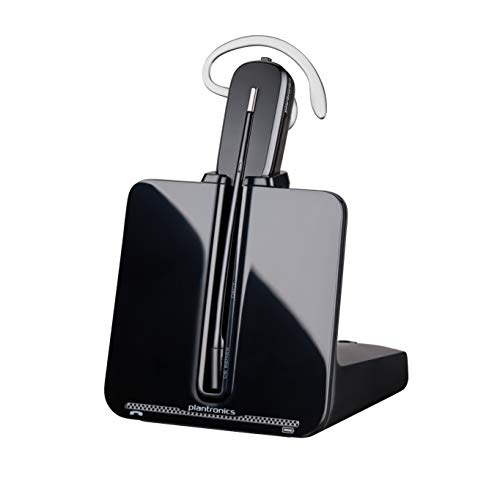
Plantronics CS540 Wireless DECT Headset (Mono)

MKJ Cisco RJ9 Corded Phone Headset

Logitech H390 Wired USB-A Headset (Off-White)

Logitech H390 Wired USB-A Headset (Rose)

Logitech H391 Wired USB-C Headset (Graphite)

MAIRDI Phone Headset with RJ9 & 3.5mm Jacks

Plantronics CS540 Wireless Headset with HL10 Lifter (Renewed)

Wantek Cisco Landline Phone Headset

Wireless Bluetooth Headset for Calls & Meetings

Wantek Yealink RJ9 Phone Headset with Quick Disconnect
Taking A Closer Look At The Options
The CS540 has been a fixture in reception areas and sales floors for years, and it’s easy to see why. It connects to your desk phone through DECT, a dedicated radio standard that keeps calls clear even when Wi-Fi is congested, giving you roughly 400 feet of roaming range and up to seven hours of talk time per charge.
Three wearing styles ship in the box, so you can switch between earhook, headband, and behind-the-neck fits as your day demands. A noise-canceling microphone helps callers hear you rather than the printer running behind you.
What Makes Sense
- Roams far from the base, so you can grab files or answer the door mid-call
- Convertible design suits different head shapes and preferences without extra purchases
- Noise-canceling mic keeps conversations legible in busy open offices
- Full-day talk time covers most shifts on one charge
Things To Consider
- Works only with desk phones out of the box, so laptop users need an adapter route
- The charging cradle needs a permanent spot on a crowded desk
Key Specs
Who It Suits Best
Desk-centric professionals who take back-to-back calls and want to move freely around a home office or front desk.
A Better Fit Elsewhere
If your day splits between a desk phone and a laptop, the MAIRDI dual-jack headset below handles both devices from one unit.
RJ9 is the small rectangular plug found on most office desk phones, and this MKJ unit speaks that language natively for Cisco handsets. There’s no battery, no pairing, no software: you plug it into the headset port and start talking, which makes it a sensible first wired upgrade.
The single-earpiece design flips between left and right ears, handy when you share a workstation or just prefer one side. Callers get a noise-canceling microphone aimed at keeping your voice forward and office chatter behind it.
What Works In Its Favor
- True plug-in operation means zero setup time on supported Cisco phones
- Ambidextrous single-ear wear adapts to either side
- Noise-canceling mic helps in shared or echoey rooms
- Corded power means it never dies mid-shift
Small Caveats
- Compatibility centers on Cisco phones, so verify your handset before ordering
- A tethered cord limits movement compared with the Plantronics CS540 above
Right Fit For
Budget-minded offices and solo workers already running Cisco IP phones who want dependable audio without extras.
Swap It Out When
Your desk runs Yealink hardware instead; the Wantek Yealink headset later in this list matches those models directly.
For video meetings rather than landline calls, the H390 remains one of the easiest recommendations going. One USB-A plug carries both audio directions, so Windows and Mac machines recognize it instantly with no drivers to chase down.
The left-sided boom mic swings up and tucks away between calls, converting the headset into ordinary headphones for music. In-line controls put volume and mute within thumb’s reach, which matters more than it sounds once you’re muting a dozen times a day.
Good Reasons To Consider
- Genuine plug-and-play setup across major operating systems
- Tuckable boom mic doubles its role as everyday headphones
- In-line mute and volume save fumbling through software menus
- Stereo drivers handle meeting audio and casual listening alike
Points To Note
- Newer laptops lacking USB-A ports will need a dongle or adapter
- The padded earcups can warm up during long summer sessions, owners commonly report
Feature Snapshot
Made For
Remote employees and students whose meetings happen on a laptop or desktop rather than a desk phone.
Reach For A Different Pick When
Your machine only offers USB-C; the Logitech H391 later in this list provides the same experience natively.
Everything said about the off-white H390 applies here, because under the finish it’s the same headset: USB-A plug-and-play, a tuckable boom mic, and in-line volume and mute controls. The difference is purely visual, wrapped in a soft rose tone that reads more considered than typical office black.
That sounds cosmetic until you realize how much desk gear sits in frame on video calls. Matching peripherals make a home office feel intentional, and this colorway does that without changing anything about daily behavior.
What Pays Off
- Distinctive rose finish that looks composed on camera
- Identical proven H390 functionality underneath
- Same tuck-away mic for music between meetings
- In-line controls stay convenient regardless of color
Less Ideal Details
- Color availability may vary by region and stock cycles
- Still requires USB-A, unlike the USB-C H391
Who Will Love This
Home-office stylists and content creators who want their visible gear coordinated rather than corporate gray.
Another Choice May Suit
Shared team deployments usually favor the neutral off-white H390, which blends into any desk environment.
Modern laptops keep dropping USB-A ports, and the H391 answers that shift directly. The USB-C connection plugs straight into current MacBooks, thin ultrabooks, and tablets, carrying digital stereo audio and mic input through a single reversible connector.
You still get the practical touches that made the H390 popular: a noise-canceling mic, in-line volume and mute, and drivers tuned for meeting clarity alongside music. Notably, part of its plastic housing uses post-consumer recycled material, a small but real nod toward lower-impact manufacturing.
Positive Points
- Native USB-C avoids adapters on newer machines
- In-line controls keep mute one press away
- Noise-canceling mic suits open-plan and home distractions
- Recycled plastic content trims the product’s footprint
Worth Bearing In Mind
- Older desktops with USB-A-only ports are left out unless you add a converter
The Right Fit
Professionals on recent-generation laptops who want a tidy, future-proof wired setup with no dongles.
Where A Sibling Pick Shines
Desktop towers and older laptops still serve the USB-A H390 better, since no adapter is needed there.
Most people don’t live on one device anymore, and MAIRDI built this headset for exactly that reality. The quick-disconnect cable swaps between an RJ9 plug for Polycom, Avaya, and Nortel desk phones and a 3.5mm jack for cell phones, PCs, and laptops, so one headset follows you across your whole workflow.
HD-tuned audio and a noise-canceling microphone hold up in call-center conditions, which is where this style earns its keep. Compared with the Cisco-only MKJ earlier, the trade-off is broader reach at a slightly less tailored fit per brand.
Bright Spots
- Two jack types cover desk phone, mobile, and computer from one purchase
- Quick-disconnect lets you step away without removing the headset
- Noise-canceling mic performs in high-call-volume settings
- Suits major landline brands including Polycom, Avaya, and Nortel
- Corded reliability means no charging routine
Some Limits To Know
- You should confirm your specific phone model against the compatibility guide before buying
- Swapping cables adds a small step the MKJ never needs
Core Details
Best Suited To
Support agents and hybrid workers alternating between a company landline and personal devices throughout the day.
Consider Something Else When
Your calls never leave a single Cisco desk phone; the cheaper MKJ headset handles that narrower job well.
This renewed bundle pairs the familiar CS540 convertible wireless headset with the HL10 handset lifter, a small mechanical arm that physically raises your desk phone’s receiver when a call arrives. That means you can answer from across the room without touching the phone itself.
Renewed units arrive inspected and functional, offering the same core experience as item one: DECT wireless, a noise-canceling microphone, and multiple wearing styles. In our view, the lifter alone justifies considering this version over the base kit for reception desks.
Useful Highlights
- HL10 lifter enables true remote call answering
- Same convertible comfort and roaming freedom as the new CS540
- Noise-canceling mic keeps speech clear near chatty coworkers
- Renewed pricing stretches a tight equipment budget
Honest Caveats
- Cosmetic condition varies unit to unit, as is typical with renewed stock
- Battery life depends on prior use history rather than fresh cells
- The lifter needs correct positioning on your specific phone model
Whose Shelf It Belongs On
Receptionists and small-office managers wanting wireless answering convenience at a reduced outlay.
Skip It When
You prefer guaranteed-new hardware; the standard Plantronics CS540 reviewed first delivers that peace of mind.
Where the MKJ targets a slice of Cisco’s lineup, this Wantek unit casts a much wider net across Cisco IP phone generations, from older 7940-series desks to newer 8851 handsets. That breadth makes it a safe bet for offices with mixed-vintage phone fleets.
A dedicated mute switch sits on the cord, letting you silence yourself without hunting through phone menus, and the high-sensitivity noise-reducing mic keeps your voice distinct amid background activity. Note that it’s strictly a landline accessory: smartphones and computers aren’t supported.
Practical Advantages
- Compatibility spans many Cisco IP generations, old and new
- Cord-mounted mute switch works faster than on-screen menus
- Noise reduction helps in crowded agent rows
- No batteries or charging to manage
Factors To Weigh
- Only certain listed Cisco models are supported, so check yours first
- Not usable with cell phones or computers by design
Product At A Glance
Who Should Grab It
Call center teams standardized on Cisco hardware who need reliable wired headsets in quantity.
Look Elsewhere When
Your fleet runs Yealink VoIP phones instead; the Wantek Yealink model closing this list is purpose-built for them.
Weight is the quiet factor behind all-day wearability, and at roughly 2.56 ounces this Bluetooth headset sits among the lightest in its class. The manufacturer reports extensive head-form evaluation behind the ergonomic shape, with ear cups that tilt about eight degrees to follow the natural angle of your ears.
For customer-service shifts and marathon meeting days, that combination aims pressure away from hotspots rather than concentrating it. You may find the fit looser than clamp-style headphones at first; give the tilt cups a few days to settle into your head shape.
Real Benefits
- Featherweight build reduces end-of-day neck fatigue
- Tilting ear cups adapt to individual ear geometry
- Bluetooth frees you from desk cords entirely
- Ergonomic shaping suits long consecutive call blocks
A Few Limitations
- Bluetooth introduces occasional pairing hiccups some owners report
- Requires a charging habit that corded picks like the Wantek units avoid
Built With In Mind
Remote support staff and virtual assistants wearing a headset six or more hours daily.
Not Your Match When
Your calls run exclusively through a landline desk phone; a wired RJ9 option like the Wantek Cisco headset connects more reliably.
Yealink runs a huge share of VoIP desks in hospitals, banks, and insurance offices, and this Wantek headset plugs straight into most of those RJ9 ports, from T21P entry models up through T54W and beyond. Grandstream and Snom phones appear on the supported list too.
The quick-disconnect cord is the standout detail for shift-based teams: unplug at the waist and walk away without ending the call or yanking the headset off your head. Like its Cisco sibling earlier, it’s a landline-only tool with a noise-canceling mic tuned for high-volume environments.
Noteworthy Benefits
- Quick disconnect supports break-time walkaways cleanly
- Extensive Yealink model coverage across T-series generations
- Noise-canceling mic suits hospital and banking floors
- Corded build shrugs off constant daily handling
Details To Watch
- Confirm your exact phone model against the published list before ordering
- Incompatible with smartphones and computers, limiting side uses
Specification Snapshot
Perfect Match For
Shift workers in hospitals, banks, and counseling services running Yealink VoIP infrastructure.
Where Another Pick Suits Better
Hybrid workers hopping between phone and laptop should choose the MAIRDI dual-jack headset instead.
What Matters Most Before Choosing Office Phone Headsets
Match The Connector To Your Phone
Start with the hardware you actually own. Desk phones speak RJ9, computers speak USB, and mixing them up is the fastest route to a return shipment. Check the exact model number printed on your handset against the seller’s compatibility list before anything else.
Weigh Wired Versus Wireless Honestly
Wireless buys you movement, typically hundreds of feet of range on DECT systems, but adds charging routines and a higher cost. Corded units like the Wantek picks never run flat and rarely misbehave. High-volume agents often prefer the predictability; roving managers value the freedom.
Comfort Outlasts Every Other Feature
A headset worn eight hours a day lives or dies on weight, clamping force, and earpad material. Lighter designs with tilting or convertible elements tend to age better across long shifts. Anyone with glasses should prioritize softer pads and adjustable bands.
Mic Quality Shapes How You’re Heard
Noise-canceling microphones separate your voice from keyboard clatter and nearby conversation, which matters most in open offices and homes with kids. Mono designs keep you aware of your surroundings; stereo suits focused solo work.
Key Considerations Across These Picks
Traps First Timers Fall Into
Ordering a headset for the wrong phone brand tops the list, followed closely by assuming every RJ9 plug fits every RJ9 port. Model lists exist for a reason, so read them. Skipping the compatibility check costs more time than it saves.
The Case For Spending Up
Higher-tier wireless systems justify their cost through range, battery life, and accessories like handset lifters that change how you work. For someone taking fifty calls daily, those upgrades pay themselves back in friction removed rather than specs on paper.
Frequently Asked Questions
Will any headset work with my office desk phone?
No, desk phones require the correct connector and wiring, usually RJ9 with model-specific compatibility. Always match the headset’s supported list to your exact phone model.
What does noise canceling mean on a headset microphone?
It refers to the microphone filtering ambient sound so callers hear mostly your voice. It improves perceived clarity in noisy rooms, though it doesn’t silence everything.
Are USB headsets better than ones made for desk phones?
Neither is universally better; they serve different devices. USB suits computer-based meetings, while RJ9 models suit traditional landlines and VoIP desk phones.
How long do office headsets typically last?
Well-treated wired units commonly serve several years, while wireless models are limited more by battery aging than structural wear. Gentle cable handling extends any headset’s life considerably.
Is a mono or stereo headset better for work calls?
Mono keeps one ear open to your surroundings, useful in shared offices and reception roles. Stereo offers richer audio for solo focus and multimedia, so choose based on your environment.
Wrap Up
The best choice comes down to your phone, not the spec sheet. Cisco and Yealink shops have purpose-built wired options here, laptop-first workers should look at the Logitech line, and anyone chained to a desk phone who craves movement will appreciate what the Plantronics CS540 brings. Match the connector first, then weigh comfort and mic quality, and the rest falls into place naturally.
