


Back-to-back video calls punish cheap audio fast. Whether you work from a spare bedroom or a busy open office, the right headset keeps your voice clean, your ears comfortable, and your attention on the meeting instead of the mute button. This shortlist covers wired bargains, wireless roamers, and long-battery over-ear options built around Microsoft Teams workflows, so you can match one to your desk, budget, and daily call load.
The Shortlist At A Glance

Jabra Evolve 20 (2025 Edition) Single-Ear Headset
Jabra Evolve 20 Wired Headset, MS Teams Certified

Poly Voyager 4320 UC Wireless Headset & Charge Stand

Poly Voyager 4320 UC Wireless Headset + Charge Stand (USB-A)

Logitech Zone Wireless Teams Bluetooth Headset

Logitech H390 Wired Headset, USB-A (Off-White)

Logitech H390 Wired Headset, USB-A (Rose)

Logitech H391 Wired Headset, USB-C (Graphite)

Lenovo Wireless VoIP Headset, Teams Certified
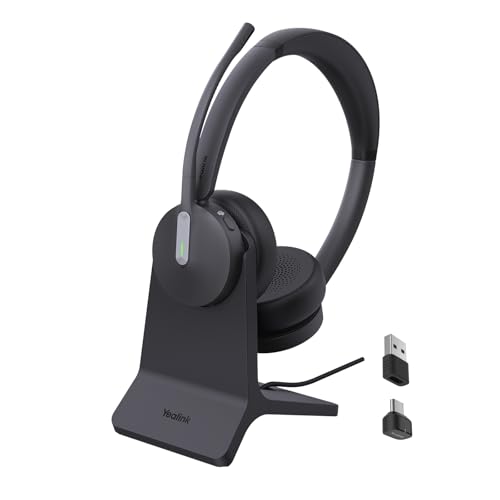
Yealink BH70 Dual Wireless Headset with Charging Stand
More On The Choices That Made The List
The single-ear layout is the whole point here. You take calls while still hearing a knock at the door, a colleague’s question, or a toddler in the next room, which makes this a natural fit for shared spaces where total isolation isn’t practical.
Jabra updated the Evolve line for 2025 with USB-C/A connectivity, so the same headset works across newer laptops and older desktop docks. Onboard call controls handle volume and muting without fumbling for the mouse mid-sentence.
A Strong Showing
- One-ear design keeps you aware of family, coworkers, or deliveries around you.
- Noise-filtering boom mic helps callers hear you rather than the room behind you.
- USB-C/A plug means it pairs with modern laptops and legacy office PCs alike.
- Lightweight frame suits long shifts without the clamp of heavier over-ear models.
Things To Consider
- Single-sided listening can feel thin for music between meetings.
- The cable is permanent, so route it away from chair wheels to protect the strain point.
Who It Suits Best
Anyone working from home who needs to stay reachable to the household while sounding professional on calls.
Where Another Pick Suits Better
Cord-cutters should look at the Poly Voyager 4320 UC instead, since its wireless range frees you from the desk entirely.
This is the sibling to the first Jabra on the list, tuned specifically for Microsoft Teams. Certification matters more than marketing suggests: buttons behave the way Teams expects, and call handling feels predictable instead of fight-the-software awkward.
You keep the same aware single-ear format and USB-C/A flexibility as the standard edition, plus inline call control that answers, ends, and mutes without touching the keyboard. For anyone whose whole day lives inside Teams, that integration is the reason to choose this variant over Item 1.
What Pays Off
- Native Teams certification means buttons map cleanly to meetings and calls.
- Mic filtering trims keyboard clatter and background chatter from your voice.
- One cable handles power-free operation, so there’s nothing to charge or forget overnight.
Worth Noting
- Wired only, which limits movement compared with the Lenovo or Yealink wireless picks.
- Ear cushions collect wear over months of daily use and may need replacing.
Made For
Support agents, coordinators, and hybrid employees whose calendar is wall-to-wall Teams meetings on a company laptop.
Consider Something Else When
If stereo music quality matters as much as calls, the Logitech Zone Wireless delivers fuller two-ear sound with active noise cancellation.
Freedom is the pitch. The included BT700 USB-C adapter links the headset to your computer over a long-range wireless connection, while Bluetooth handles your phone separately, so you can wander to the printer or the kitchen without dropping a call.
The bundled charge stand doubles as a desk anchor: set the headset down between meetings and it’s topped up by the next one. Compared with the wired Jabras above, you trade a lower price for genuine mobility, and most hybrid workers find that trade worth making.
Good Reasons To Consider
- Long-range USB-C adapter lets you leave the desk mid-call without dead spots.
- Bluetooth pairing keeps phone calls and computer meetings on separate channels.
- Charge stand keeps the battery ready and the desk tidy at day’s end.
- Boom mic with noise reduction helps you cut through busy-room audio.
Trade Offs
- Battery adds one more thing to keep charged during travel weeks.
- The stand occupies a little desk real estate in tight setups.
Right Fit For
Hybrid professionals who pace during calls and split time between a laptop and a phone.
Not Your Match When
Tight budgets are better served by the Logitech H390, which covers basic call needs for a fraction of the spend.
Same headset family as Item 3, different door into your computer. This version ships with the BT700 adapter in a USB-A form, which suits older office towers and docking stations that never made the jump to USB-C. Everything else carries over: stereo over-ear listening, a movable boom mic, and compatibility with Teams, Zoom, and similar platforms.
Poly’s dual-mic Acoustic Fence technology builds an invisible fence around your voice, filtering out the noise beyond it. In a house with kids or a coworking space full of chatter, that’s often the difference between being heard clearly and repeating yourself all afternoon.
The Helpful Details
- USB-A adapter drops straight into older desktops and dock ports.
- Acoustic Fence dual-mic setup isolates your voice from room noise.
- Stereo earcups add depth for media between calls.
- Works across major meeting platforms, not just Teams.
Minor Gripes
- Over-ear padding warms up during long summer sessions.
- You’ll want to wipe the earcups down regularly with heavy daily wear.
At A Glance
Who Will Love This
Workers on corporate hardware with USB-A ports who still want wireless range and strong voice isolation.
Look Elsewhere When
Newer laptops with only USB-C ports pair more naturally with the USB-C version of the Voyager 4320 UC listed earlier.
The Teams button on the earcup is the signature move here: one tap joins or launches a meeting, a longer press reaches voice assistant features. In a day packed with back-to-back calls, saving those few clicks each time adds up faster than you’d expect.
Logitech also built this one for IT departments. Their Sync management software lets administrators check that fleet devices are current and in use, which explains why the Zone shows up in so many company deployments. Active noise cancellation rounds out a package aimed squarely at loud, collaborative offices.
Well-Handled Touches
- Dedicated Teams button starts or joins meetings instantly.
- Active noise cancellation quiets open-plan chatter around you.
- Sync software support simplifies device management across teams.
- Bluetooth design moves freely between paired devices.
Small Caveats
- On-ear pads press directly against the ear, which some find fatiguing over very long sessions.
- Charging discipline matters; let the battery run flat too often and you’ll start days at half charge.
Quick Facts
Best Suited To
Employees in managed corporate environments, especially open offices where ambient noise never stops.
Another Choice May Suit
Solo home workers who don’t need fleet software may prefer the lighter, cheaper Yealink BH70 with its longer talk time.
Plug it in and it just works. That’s the entire appeal of the H390: a USB-A connection your computer recognizes immediately, no drivers, no dongles, no pairing rituals. For a student setting up a dorm desk or someone replacing a broken laptop mic, it removes every possible snag.
The left-side boom swings down for calls and tucks out of sight when you’re listening to music. Inline controls put volume and mute within thumb’s reach, so you’re not hunting through menus mid-meeting. It’s honest, unglamorous hardware that covers the fundamentals well.
Advantages To Know
- Plug-and-play USB-A setup gets you calling in under a minute.
- Tuckable rigid boom keeps the mic clear of your face between calls.
- Inline volume and mute controls work without leaving the call window.
- Stereo drivers handle meetings and casual listening acceptably.
Room For Improvement
- Plastic construction feels light in the hand and demands gentle handling.
- No wireless option, obviously, so you’re tethered to the machine.
- Sound tuning leans toward speech rather than rich music playback.
The Right Fit
First-time remote workers, students, and anyone who wants dependable call audio without spending much.
Swap It Out When
Your laptop only has USB-C ports; the Logitech H391 below is essentially the same experience with the modern connector.
Everything said about the off-white H390 applies here, because underneath the finish it’s the same headset: USB-A plug-and-play, a swing-away noise-reducing boom, inline volume and mute, and digital stereo drivers tuned for clear meeting audio.
The rose colorway is the deciding factor, and honestly that’s a legitimate reason to buy. Desk gear you enjoy looking at gets treated better and kept longer. Shared households can even use the colors to tell whose headset is whose, which saves the occasional pre-meeting scramble.
What Makes Sense
- Identical reliable performance to the standard H390 in a warmer finish.
- Noise-reducing boom keeps your voice front and center on calls.
- Easy inline controls mean fewer interruptions during meetings.
Points To Note
- Color availability can be spottier than the standard version, so stock varies.
- Light plastic build rewards careful storage over tossing it in a bag.
Perfect Match For
Students and home workers who want proven basics in a color that matches their setup.
Reach For A Different Pick When
Call hours climb past four or five daily; the Lenovo wireless headset’s cushioned over-ear design holds up better across marathon days.
Think of this as the H390 grown up for modern laptops. The connector is USB-C, so recent MacBooks, Chromebooks, and ultrabooks accept it directly without an adapter rattling around in your bag. Setup stays the familiar plug-and-play story.
Logitech also worked recycled plastic into the build, a small but welcome touch. The noise-canceling mic and inline controls carry over unchanged, and the graphite finish reads more understated than either H390 color. For a first proper work headset, this hits the sweet spot of simple, current, and affordable.
The Practical Payoff
- Native USB-C plugs into modern laptops without adapters.
- Recycled-plastic content softens the environmental footprint slightly.
- Clear-call mic tuning suits video meetings straight out of the box.
- Inline mute and volume keep control at your fingertips.
Honest Caveats
- Still wired, so pacing during calls isn’t happening.
- Cable care matters; tight coiling near the plug is the usual failure point.
Built With In Mind
New hires and students equipping a USB-C laptop for their first serious stretch of remote classes or meetings.
Where A Sibling Pick Shines
Older desktop machines still on USB-A belong with the original Logitech H390 rather than this model.
Battery life is the headline. Lenovo rates this one for roughly 31 hours of talk time and about 60 hours of playback, which translates to charging it once or twice a week even with heavy call days. Customer-service shifts and recruiting marathons are exactly its territory.
Bluetooth 5.3 with multipoint lets the headset hold connections to two devices at once, so a laptop meeting and a phone line coexist peacefully. The included USB-A receiver provides a steadier link for computers than raw Bluetooth alone, and replaceable earcups mean worn padding doesn’t retire the whole unit.
Positive Takeaways
- 31-hour talk rating shrugs off multi-day call loads between charges.
- Multipoint Bluetooth juggles laptop and phone simultaneously.
- Replaceable earcups extend usable life considerably.
- Open Office certification targets clear voice pickup in busy rooms.
A Few Limitations
- Over-ear weight sits noticeably heavier than the 147g Yealink after many hours.
- Receiver-based setup adds one dongle to keep track of when traveling.
Core Details
Who Should Grab It
Contact-center staff, recruiters, and consultants whose livelihood depends on staying reachable all week.
Skip It When
You prize minimal desk clutter and featherweight feel; the Yealink BH70 wears lighter and docks neatly.
At 147 grams, this is among the lightest over-ear designs in the group, and your neck notices the difference around hour six. Yealink pairs that comfort with a three-microphone array and layered noise-processing algorithms designed for exactly the environment most of us actually work in: conversations nearby, keyboards clicking, appliances humming.
The package is complete, too. A USB-C/A dongle handles the computer link, the BHC70 charging stand parks the headset between calls, and Teams certification keeps the button behavior native. Up to 35 hours of rated talk time edges out even the Lenovo on endurance.
The Case For It
- Three-mic array suppresses chatter, typing, and appliance hum effectively.
- 147g frame reduces fatigue across genuinely long wearing sessions.
- Charging stand keeps the desk organized and battery predictable.
- Dual connectivity covers both computer and phone workflows.
What To Weigh
- On-ear fit presses lightly against the ear rather than enclosing it fully.
- Stand placement needs a flat spot, awkward on cramped or sloped desks.
Feature Snapshot
Whose Shelf It Belongs On
Anyone in a loud shared workspace who wears a headset most of the day and values comfort as much as clarity.
A Better Fit Elsewhere
Strictly occasional callers will find everything they need in the far simpler Logitech H390 without the premium features going unused.
What Matters Most Before Choosing Teams Headsets
Match the Design to Your Space
Single-ear headsets like the Jabra Evolve 20 keep you anchored to your surroundings, which parents and open-office workers appreciate. Over-ear stereo models such as the Yealink BH70 shut more of the world out, helping concentration in genuinely noisy rooms. Neither approach is wrong; the right answer depends on how much isolation your day requires.
Wired or Wireless Is a Lifestyle Call
Wired picks cost less, never need charging, and rarely fail mysteriously. Wireless models free you to pace, grab coffee, or print documents mid-call, and the better ones hold a stable connection across a whole home. Count how often you actually leave the desk during calls before paying for freedom you won’t use.
Certification and Controls Save Friction
Teams-certified devices map their buttons to real meeting behavior, so answering, muting, and joining feel instant. Uncertified gear usually works too, but small quirks pile up over hundreds of calls. Frequent callers notice the difference within a week.
Comfort Compounds Over Time
A headset worn two hours weekly forgives almost anything. One worn eight hours daily exposes every pressure point and warm earcup. Weight, pad material, and clamp force deserve as much attention as microphone specs for heavy users.
Key Considerations Across These Picks
Pitfalls Shoppers Hit
The most common mistake is buying wireless for a desk-bound job and resenting the charging routine. Another is ignoring port types, then discovering a USB-A dongle has nowhere to live on a modern laptop. Check both before ordering.
The Case For Spending Up
Higher-tier models earn their price through microphone arrays, multipoint Bluetooth, longer batteries, and replaceable parts. Heavy callers recoup that investment quickly in fewer frustrations; light users rarely will.
Frequently Asked Questions
Do these headsets work outside Microsoft Teams?
Yes. Every model here functions as a standard computer headset for Zoom, Google Meet, and phone calls. Certification simply guarantees smoother Teams-specific button behavior.
Is a noise-canceling microphone the same as noise-canceling headphones?
No. A noise-canceling mic cleans up what callers hear from you. Noise-canceling headphones reduce what you hear from the room, and some products offer only one of the two.
Will a wired headset drain my laptop battery?
Negligibly. USB headsets draw a tiny amount of power compared with the display or Wi-Fi radio. Battery-conscious shoppers lose nothing meaningful choosing wired.
How long do headset ear cushions typically last?
With daily wear, foam and leatherette pads commonly compress or flake within a year or two. Models with replaceable earcups, like the Lenovo pick, let you refresh them cheaply.
Multipoint Bluetooth sounds useful. What does it actually do?
Multipoint lets one headset maintain active connections to two devices at once, such as a laptop and a phone. Calls arriving on either device come through without manual re-pairing.
Wrap Up
Your call volume should drive the decision more than any spec sheet. Light callers get everything they need from the Logitech H390 or H391, while daily meeting marathoners will feel the difference a Yealink BH70 or Lenovo wireless model makes by Friday afternoon. Match the design to your room, confirm the port, and any of these ten will serve you well through 2026.
