


Thin gaming laptops ask for a trade-off, and the good ones make it feel manageable. You get easier packing, cleaner desk setups, and a chassis that slips into a commute bag without turning into dead weight, but you still need enough cooling, screen speed, and graphics power to keep games smooth.
This list focuses on slim machines that make sense for everyday gaming, college carry, mixed work-and-play use, and portable desk setups. You’ll also see two portable screen extenders, since a thin laptop often pairs well with extra display space on a small desk or at a travel station.
The Shortlist At A Glance

ASUS ROG Strix G16 (2025) Gaming Laptop G615JH-DS54
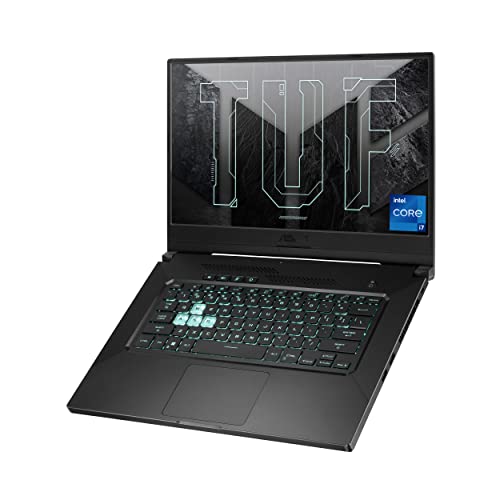
ASUS TUF Dash 15 (2021) Ultra Slim Gaming Laptop TUF516PE-AB73

ROG Zephyrus G15 (2020) Ultra Slim Gaming Laptop GA502IU-ES76

Acer Nitro V Gaming Laptop ANV15-52-586Z

msi Katana 15 HX 15.6” 165Hz QHD+ Gaming Laptop B14WGK-016US
Miesebe Laptop Screen Extender Monitor Portable 15.6-inch

Miesebe Laptop Screen Extender 14-inch
More Details On Our Top Picks
The Strix G16 takes the middle ground seriously, which matters more than flashy slogans for a thin gaming laptop. Its 16-inch 16:10 panel gives you a little extra vertical room, so menus, chats, and work documents feel less cramped than on a standard 16:9 screen.
The Intel Core i5-13450HX and GeForce RTX 5050 pairing should suit you well for modern games at sensible settings, and the 1TB PCIe Gen 4 SSD gives you breathing room for a bigger library. The trade-off is clear enough, though, a slimmer gaming build still asks you to respect heat and fan noise during longer sessions.
Strong Points
- 16:10 display shape gives you more usable vertical space for games, spreadsheets, and web tabs.
- 1TB Gen 4 SSD means you can keep several large installs on hand without living in storage cleanup mode.
- 16GB DDR5-5600 memory helps the laptop keep pace with heavy launches, voice chat, and background apps.
- Wi-Fi 7 is a welcome future-facing touch for crowded home networks and fast router setups.
Areas To Watch
- The i5 class chip is sensible, not extravagant, so deep creator workloads belong on a stronger machine.
- A 16-inch gaming chassis still takes up noticeable bag space compared with the slimmer screen extender picks later in this list.
Who It Suits Best
You’ll get the most from this one as a daily gaming and school-work hybrid, especially if you want a single laptop that can stay on your desk and still travel without feeling bulky.
Where Another Pick Suits Better
msi Katana 15 HX fits you better for heavier game libraries and more demanding performance needs, while the Acer Nitro V makes more sense for a tighter gaming budget.
This TUF model leans into portability first, and that makes sense for commuting gamers who want a smaller footprint without giving up a real graphics chip. The 144Hz display keeps motion smoother than a basic office panel, which helps in fast shooters and makes everyday scrolling feel a bit cleaner.
The RTX 3050 Ti and 8GB DDR4 put it in a lighter-duty lane than the Strix G16 above, so you’re choosing convenience over headroom. Still, the slim chassis and GeForce RTX pairing give you a practical travel companion for esports titles, older games, and general use in a dorm or shared apartment.
Plus Points
- Ultra-slim design is easier to carry than bulkier gaming rigs.
- 144Hz panel helps animation and cursor motion feel smoother in daily use.
- Intel Core i7-11370H gives you a capable everyday processor for classwork and lighter creative tasks.
- 512GB PCIe NVMe SSD is quick for booting and launching a modest game library.
Minor Gripes
- 8GB memory can feel tight once game launchers, browser tabs, and chat apps pile up.
- The older RTX 3050 Ti sits below the stronger graphics picks in this roundup.
- Thin gaming bodies often need more careful dust cleaning around vents over time.
Built With In Mind
You’re the best match for this one if you want a slim laptop for lighter gaming, class, and travel days without carrying a heavy chassis.
Skip It When
ASUS ROG Strix G16 suits you better for newer games and more storage room, while the ROG Zephyrus G15 is the smarter call for a more spacious 1TB drive in a thinner frame.
The Zephyrus G15 still makes sense because it balances thinness with a more generous 1TB PCIe NVMe SSD and 16GB of memory. Compared with the TUF Dash 15, it gives you more room to keep games and apps installed, which helps a lot if you hate constant uninstalling.
The GTX 1660 Ti Max-Q is older now, so you’re not buying this for cutting-edge visuals. You’re buying it for a lighter chassis, a 144Hz IPS display, and a Ryzen 7 4800HS that remains comfortable for everyday multitasking, especially in a café, classroom, or hotel room setup.
Highlights
- 1TB SSD gives you plenty of install space for a thin machine.
- 16GB DDR4 is a friendlier starting point for multitasking than the 8GB model above.
- 144Hz IPS-type panel keeps motion cleaner for fast-moving games.
- Backlit keyboard helps in dim rooms or late-night sessions.
Worth Noting
- GTX 1660 Ti Max-Q is a generation behind newer graphics options here.
- Windows 10 Home dates the platform, so some shoppers will prefer a newer software setup.
Who Will Love This
You’ll like this most if you want a slim, travel-ready gaming laptop with more storage headroom than the TUF Dash 15.
Look Elsewhere When
Acer Nitro V fits you better for a newer graphics path, while msi Katana 15 HX is the stronger step up for demanding play and higher-end parts.
The Nitro V lands in a very useful middle lane, especially for you if gaming shares desk space with classes or remote work. Its 15.6-inch FHD IPS panel at 165Hz gives you smoother motion than the Zephyrus G15’s older platform, while the RTX 4050 points to a more current graphics tier.
The 8GB DDR5 and 512GB Gen 4 SSD keep the price-minded layout intact, so this is not a spec monster. The honest read is that it suits everyday play, not all-out max settings, but the backlit keyboard and Wi-Fi 6 make it easy to live with in a typical bedroom or apartment setup.
What We Like
- RTX 4050 gives you a newer graphics path than the older RTX 3050 Ti and GTX 1660 Ti picks.
- 165Hz display is a good fit for fast motion in action games.
- DDR5 memory is a modern touch that helps the system feel current.
- Backlit keyboard is handy in low light and late-night study sessions.
Room For Improvement
- 8GB memory is the first thing you’ll likely outgrow.
- 512GB storage can fill quickly once a few larger games are installed.
- Fans on slim gaming laptops often become more noticeable under long loads.
Best Suited To
You’re a solid match for this one if you want a current-gen graphics chip without moving up to a heavier, pricier class.
Another Choice May Suit
ASUS ROG Strix G16 fits better for more storage and a broader overall package, while msi Katana 15 HX is the stronger pick for higher-end performance ambition.
Feature Rundown
This Katana sits at the serious end of the spectrum, and the parts list makes that obvious fast. An Intel Core i9-14900HX, RTX 5070, 32GB of DDR5, and a 1TB NVMe SSD create a much stronger lane than the slimmer, more modest ASUS and Acer picks above.
The QHD+ 165Hz display also matters, because sharper resolution gives you more detail in a 15.6-inch frame without giving up smooth motion. The trade-off is that this sort of hardware usually asks more from cooling and battery life, so it suits you best as a desk-first gaming machine that can still move when needed.
Best Bits
- Core i9-14900HX gives you a high-output processor for demanding gaming and heavy multitasking.
- RTX 5070 moves this far beyond the entry-level picks in performance headroom.
- 32GB DDR5 is a welcome fit for streaming, editing, and large game libraries.
- QHD+ panel adds sharper detail, which helps visual clarity on a 15.6-inch screen.
- 1TB NVMe SSD gives you comfortable install space without day-one storage juggling.
Softer Spots
- Higher-power hardware usually brings more fan noise under load.
- The package makes more sense on a desk than in a light travel bag.
Who Should Grab It
You’ll appreciate this most if you want a thin-ish gaming laptop with strong performance headroom for modern games and heavier multitasking.
Where A Sibling Pick Shines
ASUS ROG Strix G16 suits you better for a more balanced all-round layout, while the Acer Nitro V is the easier fit for a lower-cost mainstream setup.
Core Details
This is less about raw gaming power and more about making a thin laptop feel bigger on the desk. The 15.6-inch IPS panel, 1920 by 1080 resolution, and 60Hz refresh suit spreadsheets, chat windows, launchers, and walkthrough tabs beside your main screen.
At 38.1 x 23.8 x 2.21 cm and 1.82 kg, it’s a carryable add-on rather than a featherweight one. You’ll feel that most on travel days, but the plug-and-play style and multi-device compatibility can be useful for students, remote workers, or anyone who splits time between a laptop and a compact desk.
Reasons To Buy
- Triple-screen layout gives you much more room for gaming side tools, notes, and work apps.
- IPS panel helps colors and viewing angles stay consistent across the screen.
- 15.6-inch size matches many common laptop setups without feeling oversized.
- Two-cable setup keeps the connection path fairly straightforward for desk use.
Points To Note
- Weight matters here, so it’s better for a desk than for daily one-bag travel.
- Compatibility checks deserve attention, especially on laptops without a full-featured USB-C port.
- Extra cables and driver steps can make first setup take a little patience.
The Right Fit
You’re the best match if your thin gaming laptop also serves as a work station and you want more screen room without moving to a full desktop monitor.
Swap It Out When
Miesebe Laptop Screen Extender 14-inch fits you better for a more compact add-on, while ASUS ROG Strix G16 is the stronger pick if you want to keep everything inside one laptop.
Feature Snapshot
This 14-inch extender is the lighter-touch companion in the screen-accessory side of the list. It suits tight desks, carry-on setups, and quick plug-in work sessions where a full-size external monitor would feel excessive.
The FHD 1080p panel, 72% sRGB color gamut, and 300 nits brightness point to a sensible everyday display rather than a flashy creative panel. That makes it a nice sidekick for travel, although the smaller size means you’ll want to keep expectations realistic for long editing or heavy spreadsheet days.
Bright Spots
- 14-inch size is easier to tuck beside a laptop in a compact bag or on a narrow desk.
- 1080p resolution keeps the image sharp enough for text and browser work.
- 300 nits brightness helps the panel stay visible in typical indoor settings.
- Plug-and-play format suits quick setups for students and mobile work routines.
Small Caveats
- The smaller panel gives you less breathing room than the 15.6-inch extender above.
- 72% sRGB is fine for everyday use, though color-critical work calls for more display headroom.
- Like most portable add-ons, cable management takes a little tidying on a busy desk.
Whose Shelf It Belongs On
You’ll like this most if you want a compact second screen for travel, remote class days, or light work alongside a slim laptop.
Reach For A Different Pick When
Miesebe Laptop Screen Extender Monitor Portable 15.6-inch fits you better for a larger side panel, while Acer Nitro V is the stronger choice if you’d rather spend on the laptop itself.
What Matters Most Before Choosing Thinnest Gaming Laptops
Mistakes Worth Dodging
Thin gaming laptops can hide trade-offs behind a sleek shell, so you need to weigh the GPU, cooling layout, and memory together. A slim body with 8GB memory and a modest graphics chip works for lighter play, but it won’t feel generous in the long run.
The Case For Spending Up
Higher-tier models usually pay for a stronger processor, more capable graphics, larger storage, and a sharper display. That upgrade makes sense for long sessions, heavy multitasking, and anyone who wants fewer compromises in a single machine.
Frequently Asked Questions
How thin should a gaming laptop be?
There’s no single right number, because portability and cooling pull in different directions. A good thin model gives you easy carry without making the fans feel like a constant burden.
Do thin gaming laptops run hotter?
Many slim designs have less room for heat dissipation, so they often feel warmer under sustained load. That’s normal, and it’s why airflow and vent placement matter so much.
Is 8GB memory enough for gaming?
It works for lighter games and simpler multitasking. You’ll feel the limit faster once you keep browser tabs, voice chat, and a game open together.
Are screen extenders worth adding to a thin laptop?
They help a lot for multitasking, especially on a small desk or during travel work. They’re less useful for pure gaming unless you also need side apps, notes, or chat windows.
What screen refresh rate should you look for?
For gaming, 144Hz or 165Hz gives you smoother motion than a basic 60Hz panel. That difference stands out most in fast movement, scrolling, and quick camera turns.
Final Thoughts
You get the best results from a thin gaming laptop when the parts match the way you actually use it. The Strix G16 and Nitro V feel like the most broadly useful laptop choices here, while the screen extenders make sense for desk-based multitaskers who want more space without carrying a full monitor.
