


Touch gaming laptops solve a specific problem, you want fingertip control without giving up enough power for modern games, schoolwork, or travel. The best ones balance display quality, cooling, memory, and storage so you’re not stuck with a pretty screen that feels slow in real use. This roundup leans toward models that make sense in a dorm, a home office, or a couch setup where touch input actually earns its keep.
The Shortlist At A Glance

ASUS TUF Gaming F16 (2025) Gaming Laptop (16” FHD+ 165Hz)

Acer Nitro V 16S AI Gaming Laptop ANV16S-41-R2AJ

HP 15.6 inch Laptop, HD Touchscreen Display, AMD Ryzen 5 7520U
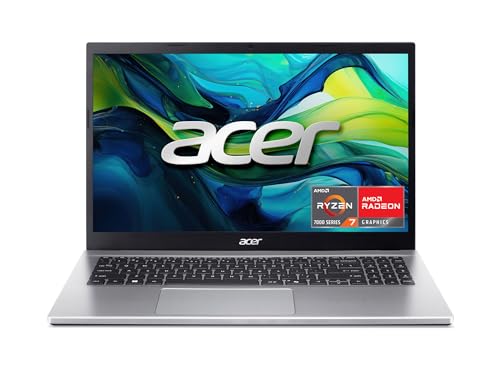
Acer Aspire Go 15 AI Ready Laptop AG15-42P-R9FW

Lenovo IdeaPad Slim 3 Laptop 2025 15.6” Touchscreen
Dell 15.6 Laptop, FHD, Intel Core i7 1355U
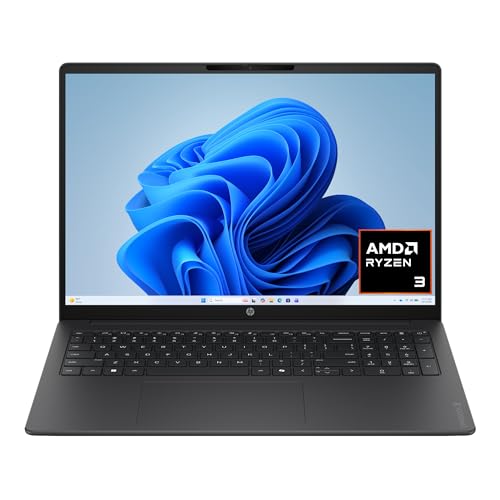
HP OmniBook 3 16 inch Laptop PC, 2K Touchscreen, Ryzen 3
More Details On Our Top Picks
The 16:10 panel gives you a bit more vertical room, which helps in spreadsheets, game menus, and long web pages. Paired with a 165Hz refresh rate, it suits you better than a basic office panel if you split time between gaming and everyday work.
The Intel Core i5-13450HX and RTX 5050 combo puts this in the practical gaming lane, not the flashy-luxury lane. That honest middle ground is useful for commuters and dorm setups, especially since the 16GB memory and 512GB SSD keep the system feeling ready for daily use.
Strong Points
- 165Hz motion feels smoother in fast scenes and in general scrolling.
- 16:10 shape gives you extra vertical space for work and school tasks.
- 16GB DDR5 memory helps with multitasking, tab-heavy browsing, and launch speed.
- RTX 5050 graphics give you a clearer path into modern gaming than older entry chips.
Things To Consider
- 512GB storage fills faster once you install several large games.
- The TUF chassis is practical, though it leans more functional than refined.
- You may want an external mouse for long sessions, since touch screens and gaming controls rarely mix well.
Feature Rundown
Who It Suits Best
It’s a smart fit for you if you want a gaming laptop that still handles classwork, browsing, and streaming without feeling oversized.
Where A Sibling Pick Shines
The Acer Nitro V 16S AI suits you better if you want more memory and storage straight away.
Here the emphasis shifts from the TUF F16’s balanced feel to outright spec density. A Ryzen 7 260 processor, RTX 5060 graphics, 32GB DDR5 memory, and 1TB Gen 4 SSD make this a strong fit for heavier gaming loads and plenty of multitasking.
The slim chassis matters too, especially for anyone carrying a machine between classes, work, and a desk at home. The honest trade-off is that packed hardware usually asks more of the cooling design, so you’re buying into a more serious platform than a basic everyday notebook.
Highlights
- 32GB memory gives you a comfortable cushion for games, browsing, and creative work.
- 1TB SSD leaves more room for installed titles and media files.
- The RTX 5060 class GPU suits demanding game settings better than entry-level parts.
- Slim build helps it stay practical in a backpack.
- Wi-Fi 6 keeps modern wireless networking support in the mix.
Worth Noting
- The stronger parts can mean more heat and fan noise under load.
- Its lean profile is nice to carry, though it leaves less room for bulky ports and cooling headroom.
This HP lands in friendlier territory than the gaming-heavy first two picks. The HD touchscreen makes simple taps and swipes useful for browsing, note taking, and family use, while the Ryzen 5 7520U and 8GB memory keep the machine in the everyday-work lane.
You also get a 512GB SSD, so storage feels more comfortable than the smallest budget machines. The trade-off is that 8GB RAM and integrated Radeon graphics fit lighter workloads best, which is fine for school, email, streaming, and casual play.
Upsides
- Touch input makes routine navigation feel quicker and less fussy.
- 512GB SSD gives you room for documents, photos, and several apps.
- Simple hardware tends to stay easy to manage for basic home use.
Areas To Watch
- HD resolution is modest beside the sharper panels in the Acer and HP 16-inch options.
- 8GB memory can feel tight with many tabs and apps open at once.
- Touch screens show fingerprints more readily, so a soft cloth helps with upkeep.
Details At A Glance
Who Will Love This
It suits you best for light schoolwork, home browsing, and touch-driven convenience more than heavy gaming.
Look Elsewhere When
Choose the ASUS TUF Gaming F16 if you want a much stronger path into games and faster graphics support.
Compared with the previous HP, this Acer steps up the screen quality with a full HD IPS panel, which usually looks cleaner for split-screen work and longer viewing sessions. The Ryzen 7 7730U, 16GB DDR4, and 512GB PCIe Gen4 SSD make it feel more suited to steady productivity than casual-only use.
That makes it a sensible fit for home offices, students, and families who want a large enough machine to keep around the house. It’s not a gaming-first build, though the Radeon graphics and stronger processor give you more flexibility than the simplest touchscreen notebooks.
Best Bits
- FHD IPS display gives you sharper text and more consistent viewing angles.
- 16GB memory helps with multitasking and smoother day-to-day switching.
- PCIe Gen4 SSD supports quick loading and file access.
- Ryzen 7 7730U offers comfortable headroom for routine productivity.
Minor Gripes
- DDR4 memory is serviceable, though it’s older than the DDR5 found in the gaming models above.
- Integrated graphics keep gaming and demanding creative work in a lighter lane.
Feature Snapshot
Right Fit For
It works well for you if productivity, streaming, and a clean touchscreen setup matter more than gaming muscle.
Another Choice May Suit
The Lenovo IdeaPad Slim 3 fits you better if you want a touchscreen with Bluetooth 5.2 and a built-in 720p camera for calls.
The Lenovo feels like the most work-friendly touchscreen in this group, especially with 16GB DDR4 memory, Wi-Fi 6, Bluetooth 5.2, and a 720p camera on the spec sheet. That mix makes sense for classes, meetings, and a desk setup where you want a simple all-day machine with touch support.
Its Ryzen 7 5825U is older than the chips in the Acer models, yet it still suits routine productivity well. The trade-off is clear enough, you get plenty of practical connectivity and enough memory for normal multitasking, but not the gaming headroom of the RTX-equipped picks.
Positives
- Touchscreen control feels useful for notes, scrolling, and casual navigation.
- 16GB memory supports a steadier multitasking flow.
- Wi-Fi 6 and Bluetooth 5.2 give you modern wireless flexibility.
- 720p camera helps cover video calls without extra gear.
Points To Note
- 8-core branding aside, the platform is still a productivity-first choice, not a gaming machine.
- The 720p camera is functional, though sharper external options exist.
Core Details
Whose Shelf It Belongs On
It fits you best if you want a touch-friendly laptop for school, office tasks, and everyday browsing.
Skip It When
The Acer Nitro V 16S AI is the better call for you if gaming and heavier graphics work sit higher on your list.
The Dell keeps things plain in a helpful way, with an FHD screen, Intel Core i7-1355U, and 16GB RAM aimed at everyday speed. That mix usually suits work documents, family browsing, and streaming better than the more game-focused machines above.
It does not lean on touch, so it sits outside the main touchscreen theme a bit, but it still earns a place for shoppers who want a straightforward, efficient 15.6-inch laptop. The trade-off is less flair, though many people will treat that as a plus rather than a minus.
Bright Spots
- Core i7 and 16GB RAM give you comfortable everyday responsiveness.
- FHD display is a sensible match for office work and video.
- Simple configuration usually means less learning curve.
Softer Spots
- It lacks the touch control that gives the category its special appeal.
- Gaming ambition stays modest compared with the RTX-equipped ASUS and Acer picks.
- Plain finishes often look clean, though they can feel a little generic beside the HP OmniBook 3.
The Right Fit
It suits you best as a dependable home or office machine where smooth basics matter more than touch input.
Reach For A Different Pick When
The HP 15.6 inch touchscreen makes more sense if you want fingertip control in the same general size class.
The 16-inch 2K touchscreen is the hook here, and it makes the OmniBook 3 feel more spacious than the smaller 15.6-inch options. For streaming, browsing, and split-screen work, that extra room can feel like a wide desk spread out in front of you.
Ryzen 3, 8GB RAM, and a 256GB SSD keep it closer to light-use territory, so it suits simple daily tasks more than serious gaming. That’s the key trade-off, you get the biggest visual presence in the group, but not the most headroom for heavy loads.
Upsides
- 2K resolution gives you a sharper-looking 16-inch workspace.
- Touchscreen control makes casual navigation feel natural.
- Large panel helps with side-by-side windows and media viewing.
Small Caveats
- 256GB storage is the tightest in this roundup, so file management matters.
- 8GB RAM keeps it in lighter multitasking territory.
- AMD Radeon 610M graphics fit everyday use far better than gaming.
Perfect Match For
It suits you best if you want a large touch display for media, browsing, and simple productivity.
Swap It Out When
The Acer Aspire Go 15 gives you more storage and stronger overall balance for routine work.
What Matters Most Before Choosing Touch Gaming Laptops
Screen First, Then Speed
Touch panels need enough resolution and brightness to feel useful, not just present. A 16:10 or 2K screen helps with menus, timelines, and multitasking, while a higher refresh rate matters more once your games start moving fast.
Memory And Storage
8GB RAM works for lighter use, but 16GB or more feels safer for gaming plus background apps. A 512GB SSD is the minimum that still feels comfortable, and 1TB becomes useful once your game library grows.
Power Vs Portability
A stronger GPU and processor usually bring better frame rates, yet they also add heat, weight, and fan noise. Slim machines travel better, while thicker ones often leave more room for cooling and longer sustained performance.
A Quick Read On Value And Trade-Offs
Common Shopping Slip Ups
Touch gaming laptops can look similar on paper, so don’t let the screen label distract you from the graphics chip and memory. A touch display without enough GPU power turns into an expensive compromise.
The Upgrade Payoff
Higher-tier models tend to justify themselves through better graphics, larger SSDs, and more headroom for multitasking. That matters most for long gaming sessions, creative work, or anyone who keeps many apps open all day.
Frequently Asked Questions
Are Touch Gaming Laptops Good For Daily Work?
Yes, touch control makes browsing, note taking, and scrolling feel faster and more direct. The better models also give you enough memory and storage for ordinary work tasks.
Do Touch Screens Help In Games?
Sometimes, but mostly for menus, launching apps, and casual touch-friendly titles. A mouse or controller still makes more sense for most games.
How Much RAM Feels Right?
16GB is the comfortable starting point for most touch gaming laptops. 8GB can work, but it feels tighter once you start juggling games and browser tabs.
Is A 1TB SSD Worth It?
It helps a lot once you install several large games and keep media files locally. Smaller drives can work, but you’ll manage storage more often.
Which Screen Size Fits Best?
A 15.6-inch model feels easier to carry, while 16-inch options usually give you more room for work and entertainment. The better fit depends on how often you move the laptop.
Final Thoughts
You get the best results from this category when the screen, memory, and graphics card all match your day-to-day routine. The ASUS and Acer models make the strongest case for gaming, while the HP and Lenovo touch options suit lighter, more general use. Choose the one that matches how you actually spend your hours, not just the spec sheet.
