


Touchscreen gaming laptops sit in a tricky middle ground, since you want fluid motion for games, but you also want a screen that helps with browsing, note-taking, and quick taps. The seven picks below cover that range, from serious RTX-powered machines to lighter touch-enabled options that make sense for school, travel, or mixed home use.
You’ll see clear trade-offs in size, power, and portability. That makes it easier to match a machine to your day, whether you spend it at a desk, in a dorm, or moving between meetings and game sessions.
The Shortlist At A Glance

ASUS ROG Strix G16 (2025) Gaming Laptop 16” FHD+ 165Hz/3ms

HP 15.6 inch Laptop, HD Touchscreen Display, AMD Ryzen 5 7520U

NIMO 15.6″ FHD Light-Gaming-Laptop Ryzen 7 Pro 6850U 32GB RAM

Lenovo Legion LOQ AI-Powered Gaming Laptop Intel Core i7-13650HX

ASUS ROG Flow Z13 2.5K 180Hz 13.4″ Convertible 2-in-1

HP Touchscreen Laptop Ryzen 7 7730U 32GB RAM 1TB SSD
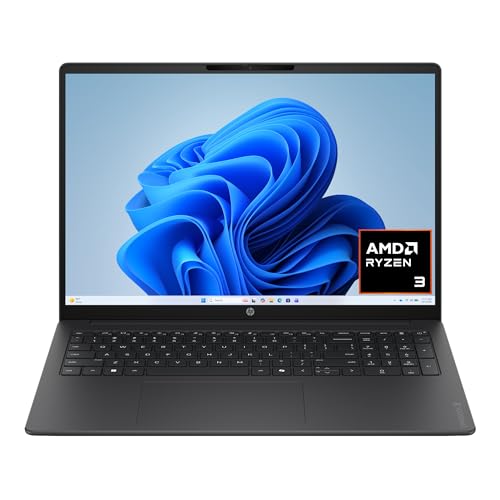
HP OmniBook 3 16 inch Laptop PC 2K Touchscreen Ryzen 3 30
More Details On Our Top Picks
A 16-inch panel with a 165Hz refresh rate and 3ms response time gives this ASUS a sharp gaming focus, and the 16:10 shape leaves a little more room for menus, timelines, and split-screen work. The Intel Core i7-14650HX and RTX 5060 pairing places it in serious territory, so you’re looking at a machine that suits long game sessions and heavier multitasking.
It also carries 16GB DDR5 memory, a 1TB Gen 4 SSD, and Wi-Fi 7, which gives you fast boot-ups, roomy storage, and current wireless support. The trade-off is the obvious one, this is a more desk-friendly laptop than a truly light travel option, so it fits best in a room where power matters more than a tiny bag.
Strong Points
- The 165Hz panel helps motion feel clean during fast play.
- 16:10 spacing makes the screen useful beyond gaming, especially for browsing and school tasks.
- 1TB of SSD storage gives you room for a substantial game library and large project files.
- DDR5 memory suits heavy tabs, launchers, and background apps without feeling cramped.
Things To Consider
- This class of hardware tends to run best with steady desktop access.
- The larger chassis will feel less convenient in a tight commute bag.
Feature Card
Who It Suits Best
Competitive gamers and multitaskers who want a strong 16-inch machine will get the most from it.
A Better Fit Elsewhere
ASUS ROG Flow Z13 2.5K 180Hz 13.4″ Convertible 2-in-1 suits you better for touch-first portability and couch-friendly use.
For everyday work, this HP keeps the focus on simplicity. The 15.6-inch HD touchscreen gives you a more hands-on way to scroll, tap, and move through basic tasks, while the Ryzen 5 7520U and integrated Radeon graphics keep the profile modest rather than bulky.
That makes sense for school notes, web use, streaming, and light project work, especially on a desk where you want a familiar clamshell shape. The honest read is that it suits practical routines more than heavy gaming, so you’ll appreciate it most for light play, not demanding titles.
What We Like
- The touchscreen adds a more direct way to handle routine navigation.
- 512GB of SSD storage is a comfortable fit for documents, apps, and media.
- Its lighter-duty hardware keeps the laptop approachable for first-time setup.
Minor Gripes
- HD resolution is more basic than the sharper panels in this list.
- Integrated graphics place clear limits on gaming ambition.
- The configuration suits casual use more than long sessions with demanding software.
Who It Suits Best
Students, home users, and casual multitaskers who want a touch screen without a complex setup will feel at home here.
A Better Fit Elsewhere
NIMO 15.6″ FHD Light-Gaming-Laptop works better for you if you want more memory and a stronger all-around multitasking cushion.
Big memory changes the feel of a laptop fast, and this NIMO leans into that with 32GB LPDDR5 plus a 1TB SSD. LPDDR5 is a newer memory type that helps keep apps responsive, which matters when you keep a lot of tabs open or juggle work files beside a game launcher.
The Ryzen 7 Pro 6850U and Radeon 680M graphics point to light gaming, not maxed-out 3D loads, yet the 100W Type-C charging support, backlit keyboard, and fingerprint login add day-to-day convenience. Compared with the HP 15.6-inch touchscreen, this one feels more capable for multitasking, while the ASUS gaming rigs still offer the heavier graphics punch.
Upsides
- 32GB of LPDDR5 memory gives you generous breathing room for multitasking.
- 1TB storage keeps large project folders and media libraries close at hand.
- The backlit keyboard helps late-night work and gaming sessions stay comfortable.
- Fingerprint login trims a little friction from daily sign-in.
- Type-C charging support adds flexibility for desk setups.
Worth Noting
- Radeon 680M graphics suit light gaming more than aggressive settings.
- The design sounds practical rather than flashy, which is fine for many desks.
Who It Suits Best
You’ll get the most from this one if you want a multitasking-friendly laptop for school, home office use, and lighter gaming.
A Better Fit Elsewhere
Lenovo Legion LOQ AI-Powered Gaming Laptop works better for you if graphics-heavy games sit higher on your list.
This Lenovo lands in the middle of the gaming laptop conversation in a useful way. The 15.6-inch FHD IPS panel with 144Hz refresh keeps motion responsive, and the RTX 5050 gives you dedicated graphics without moving into the larger, heavier-tier systems like the ASUS Strix G16.
The Intel Core i7-13650HX, 16GB memory, 1TB storage, and G-Sync support make the spec sheet feel balanced for play, school, and daily work. G-Sync is a display-sync feature that helps reduce visible tearing, so the screen side of the experience feels more polished during fast movement.
Bright Spots
- 144Hz refresh suits fast-paced games and smooth scrolling.
- 1TB storage gives you practical space for a growing game library.
- G-Sync adds a useful polish layer for motion-heavy sessions.
- The midrange hardware mix fits mixed gaming and homework use well.
Small Caveats
- The 15.6-inch format feels less expansive than the ASUS 16-inch option.
- For very heavy graphics work, higher-tier machines in this list still offer more headroom.
At A Glance
Who It Suits Best
Gamers who want a practical midrange laptop for both play and everyday computing should be comfortable here.
A Better Fit Elsewhere
ASUS ROG Flow Z13 2.5K 180Hz 13.4″ Convertible 2-in-1 suits you better if touch control and tablet-style flexibility matter more than screen size.
The Flow Z13 takes a different path from the bulkier ASUS Strix G16, and that difference matters right away. You get a 13.4-inch touchscreen in a convertible 2-in-1 body, so it works more like a hybrid between a tablet and a compact gaming machine, which is handy on a sofa, plane tray, or crowded desk.
The 2.5K panel with 180Hz refresh and 3ms response gives it a more premium display profile, while the Ryzen AI MAX+ 395, 32GB RAM, and 1TB SSD point to serious internal capacity. The flip side is that this format asks you to value portability and touch use as much as raw size, so it makes the most sense for mobile setups.
Reasons To Buy
- The touchscreen and convertible body make it unusually flexible for a gaming laptop.
- 2.5K resolution adds sharper detail for work and entertainment.
- 180Hz refresh keeps motion very smooth for a compact machine.
- 32GB RAM supports heavy multitasking and creative apps.
Areas To Watch
- The smaller 13.4-inch size will feel tight for long desktop-style sessions.
- Convertible hinges and touch surfaces usually call for a little more care during travel.
Details At A Glance
Who It Suits Best
Travel-heavy gamers and touch-focused users who want a compact machine with flexible use cases will appreciate this one most.
A Better Fit Elsewhere
HP Touchscreen Laptop Ryzen 7 7730U 32GB RAM 1TB SSD suits you better if you want a more conventional business-style notebook.
This HP feels aimed at desk work first, gaming second, and that ordering is pretty sensible. The Ryzen 7 7730U, 32GB RAM, and 1TB SSD give you a comfortable amount of headroom for multitasking, while the 15.6-inch FHD IPS touchscreen and numeric keypad make it practical for spreadsheets, browsing, and quick navigation.
Windows 11 Pro and Wi-Fi 6 add business-friendly polish, which helps if your laptop spends part of the week in a home office and part of the week in a bag. Compared with the ASUS and Lenovo gaming picks, this one is less about chasing frame rates and more about keeping your day organized without feeling sluggish.
Best Bits
- 32GB memory and 1TB storage make the laptop feel roomy for work.
- The numeric keypad helps with data entry and daily office tasks.
- Touch input makes routine navigation feel quick and familiar.
- Windows 11 Pro gives it a more work-ready profile than basic home models.
Points To Note
- Gaming focus is lighter than the dedicated RTX-equipped picks in this list.
- Its strengths lean toward productivity, so performance seekers may want more graphics muscle.
Who It Suits Best
You’ll appreciate this most if you want a touchscreen laptop for work tasks, home organization, and light play.
A Better Fit Elsewhere
Lenovo Legion LOQ AI-Powered Gaming Laptop is the better match for you if game performance matters more than business polish.
The OmniBook 3 keeps things straightforward, and that can be a strength for the right use case. A 16-inch 2K touchscreen gives you a bigger, sharper canvas than the basic HP 15.6-inch model, while the Ryzen 3 and Radeon 610M point to light-duty computing rather than demanding gaming.
That mix works nicely for streaming, browsing, casual office tasks, and a little tap-driven convenience on a larger panel. One thing worth considering is storage: 256GB is fine for a lean setup, but it leaves less room than the 1TB machines higher up the list.
Positives
- 2K resolution gives the screen a cleaner look than standard HD panels.
- The 16-inch size feels comfortable for split windows and media.
- Touch input makes routine navigation easier for casual daily use.
- Its light-duty parts keep the laptop approachable for simple tasks.
Softer Spots
- 256GB storage fills faster than the larger drives in this roundup.
- Ryzen 3 and Radeon 610M are modest for gaming ambitions.
- The larger screen does not automatically mean stronger performance.
Core Details
Who It Suits Best
Casual users who want a larger touch screen for browsing, media, and light work will get the most out of it.
A Better Fit Elsewhere
ASUS ROG Strix G16 (2025) Gaming Laptop 16” FHD+ 165Hz/3ms suits you better if graphics power matters more than simplicity.
What Matters Before You Choose A Touchscreen Gaming Laptop
Screen First, Then Power
A touchscreen helps most when you actually use it, so look at the panel type, resolution, and refresh rate together. A fast panel like 144Hz or 165Hz suits games better than a basic HD touch screen, while 2K or FHD+ gives you more useful workspace.
Match The Graphics To Your Games
Dedicated graphics matter more than marketing language. RTX-class hardware makes sense for modern games and heavier creative work, while integrated graphics work better for lighter play and everyday tasks.
Memory And Storage Shape Daily Comfort
16GB RAM is a practical floor for many gaming and multitasking setups, while 32GB gives you more breathing room. Storage also matters, since a 1TB SSD avoids the tight squeeze that shows up fast on smaller drives.
Choose The Form Factor You’ll Actually Carry
Big 16-inch systems feel great on a desk, but a convertible 13.4-inch design suits travel and touch use much better. The right answer depends on where your laptop spends most of its time.
What Changes The Price Tier Here
Where Shoppers Go Wrong
Many people focus on the touchscreen and forget the rest of the hardware. That leads to a machine that looks flexible but feels limited once you open games, launch a dozen tabs, or store a full library.
The Upgrade Payoff
Higher-tier models usually bring stronger processors, dedicated graphics, faster memory, and better displays. That extra spend makes sense when you game often, keep your laptop for years, or want one machine to cover work and play.
Frequently Asked Questions
Do touchscreen gaming laptops work well for everyday use?
Yes, especially for browsing, streaming, and note-taking. The touch layer makes simple navigation quicker and more natural.
Is a touchscreen enough for serious gaming?
The touchscreen itself is not what drives gaming performance. Strong processors, dedicated graphics, and a fast display matter more.
What screen size works best?
Sixteen-inch models suit desk use and longer sessions. Smaller convertible designs make more sense for travel and touch-heavy use.
How much RAM should you look for?
16GB works well for many mixed-use setups. 32GB is the safer cushion for heavier multitasking.
Should you prioritize storage or graphics first?
Graphics come first for gaming, while storage matters for keeping games and apps installed. A 1TB SSD gives you more breathing room than a small drive.
Closing Thoughts
Your best choice depends on how you split time between touch use, gaming, and day-to-day work. The ASUS ROG Strix G16 and Lenovo Legion LOQ lean strongest toward play, while the HP and NIMO models feel more balanced for mixed routines. Choose the one that matches your desk space, travel habits, and game library size, and the fit will feel much better over time.
