Anyone who spends hours on video calls knows the frustration of a laptop mic that picks up every keyboard tap and background hum. A dedicated USB headset solves that problem cheaply and reliably, which is why it remains a staple for remote work, call centers, classrooms, and gaming setups alike. This roundup walks through ten options spanning classic wired headsets, a wireless pick, and even compact earbuds, so you can match one to your desk, your budget, and your ears.
The Choices Worth Comparing
PickWhy We Picked ItBest ForAction

Editor’s Choice
Logitech H390 USB-A Headset (Off-White)
Proven plug-and-play reliability
Remote workers, students

Fan Favorite
Logitech H390 USB-A Headset (Rose)
Same design, warmer colorway
Style-conscious home offices

Smart Upgrade
Logitech H391 USB-C Headset (Graphite)
Modern USB-C connection
Newer laptops, tablets

Value Pick
Amazon Basics On-Ear Wired Computer Headset
Foldable dual-connection design
Budget shoppers, travelers

Performance Leader
LEVN USB Headset with Noise Canceling Mic
Strong mic noise rejection
Call centers, open offices

Comfort Choice
Acer OHR690 Wireless Bluetooth Work Headset
Featherweight all-day wear
Long-shift professionals

Feature Rich
Lenovo USB-A Wired Stereo Headset Gen 2
AI noise canceling via app
Teams and Zoom users

Compact Choice
AIAUXAI USB Earbuds with Microphone (Black)
Pocketable earbud format
Minimalist desk setups
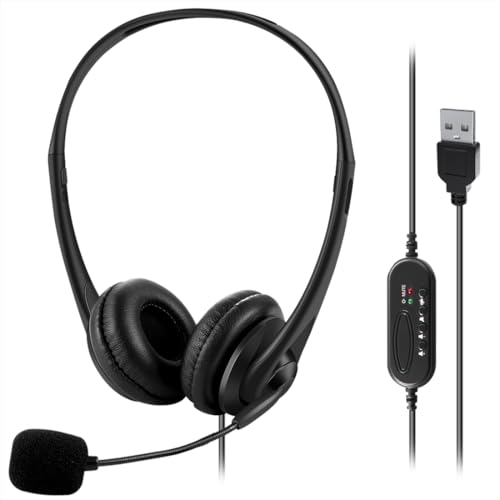
Budget Friendly
321Wasay USB Computer Headset (Black Slender)
Rotatable unidirectional mic
Noisy homes, shared spaces

Professional Pick
Acpanore USB Wired Headset for Work & Calls
Business-grade voice clarity
Customer-facing roles
What Each Pick Brings To The Table
The H390 is the headset many people end up recommending first, and it’s easy to see why. You plug it into any free USB-A port, your computer recognizes it instantly, and you’re talking within seconds. The padded on-ear cups and adjustable headband suit back-to-back meeting days without much fuss.
The rigid left-sided boom swings down when you need it and tucks away when you don’t, which keeps the desk looking tidy between calls.
What Works In Its Favor
- ✓True plug-and-play setup means no drivers to hunt down or software to install.
- ✓In-line controls put volume and mute at your fingertips mid-call.
- ✓Fine-tuned digital drivers handle meetings and music without sounding thin.
- ✓The movable boom mic stays out of sight during solo listening sessions.
Things To Consider
- •On-ear padding can feel warm over very long sessions in hot rooms.
- •USB-A only, so newer port-less laptops need an adapter.
Who It Suits Best
Daily video-call users who want a dependable, no-drama headset that just works.
Where A Sibling Pick Shines
Laptop owners with only USB-C ports should look at the Logitech H391 instead, which skips the adapter entirely.
Check on Amazon
This is the same well-loved H390 platform as the off-white version above, dressed in a soft rose finish that looks far more inviting than typical black office gear. Everything functional carries over: instant USB-A recognition, a tuckable boom mic, and in-line volume and mute buttons.
You may find the color choice matters more than expected in shared spaces like dorm rooms or family desks, where a friendlier tone feels less corporate. Functionally, there’s no reason to prefer one over the other beyond aesthetics.
What Helps Most
- ✓Identical plug-and-play behavior to the standard model, zero learning curve.
- ✓Noise-filtering boom mic keeps your voice clear on crowded calls.
- ✓Rose finish stands out without shouting, a nice touch for visible desk setups.
Worth Noting
- •Light-colored finishes tend to show scuffs and makeup marks faster than graphite options.
- •Still limited to USB-A connections on older-style ports.
Made For
Students and home-office users who want proven call quality with a bit of personality.
Consider Something Else When
Shoppers prioritizing durability over looks may prefer the darker Logitech H391, which hides wear better.
View Latest Price
Modern laptops have largely abandoned USB-A, and that’s where this H391 earns its spot. One reversible USB-C connector handles both audio and power-free operation on MacBooks, Chromebooks, and recent Windows machines without any dongle clutter.
The familiar recipe remains: a noise-canceling boom mic, in-line mute and volume keys, and drivers tuned for clear speech. Logitech also incorporates post-consumer recycled plastic into the build, which is worth knowing if sustainability factors into your purchases. Compared with the H390, you’re trading the older connector for future-proofing at a similar comfort level.
Positive Points
- ✓Native USB-C works directly with current laptops and tablets.
- ✓In-line controls let you silence yourself without fumbling through software.
- ✓Recycled plastic construction adds an eco angle rarely seen at this level.
Small Caveats
- •Desktops with only legacy ports will need a converter cable.
- •A few owners report wanting deeper bass for music-heavy use.
Right Fit For
Owners of modern USB-C laptops who refuse to carry adapters everywhere.
Skip It When
Users of older desktop towers are better served by the Logitech H390’s native USB-A plug.
Check Latest Price
Flexibility is this one’s whole personality. Unlike the single-plug Logitech models, it connects either through a 3.5mm jack or via its in-line controller’s USB-A port, covering nearly every computer you own. The frame folds flat, which makes it a genuine travel option rather than a desk prisoner.
The compact on-ear fit runs snug at first; the maker itself suggests easing in over a week or two as the cups conform. Give it that break-in window and most wearers settle comfortably, though people preferring loose over-ear cups should look elsewhere.
Features That Help
- ✓Dual connectivity covers laptops, desktops, and phones with one headset.
- ✓Foldable design slips into a bag without eating space.
- ✓Adjustable microphone arm positions close to your mouth for clearer pickup.
Points To Note
- •Initial clamp pressure is real; expect a short adjustment period.
- •Small/medium sizing may feel tight on larger heads.
At A Glance
| | Feature | Specification | Why It Matters |
|---|
| Connection | 3.5mm jack or USB-A in-line control | Works across old and new devices |
| Design | On-ear, foldable | Packs down for commuting or storage |
| Microphone | Adjustable boom arm | Tune placement for cleaner voice capture |
Who Should Grab It
Students and hybrid workers juggling multiple devices on a modest budget.
Another Choice May Suit
Anyone wanting wider, roomier cups will find the Acpanore business headset more comfortable for marathon shifts.
View on Amazon
Open-plan offices and busy households chew up cheap mics, and the LEVN is built specifically for those environments. Its rotatable microphone leans hard on noise-canceling processing, so keyboard clatter, barking dogs, and chattering coworkers stay behind the curtain while your voice comes through clean.
The HD-oriented drivers also give after-hours listening a fuller character than pure call headsets manage. Call-center staff and support agents doing eight-hour shifts are exactly who this was designed around.
Standout Benefits
- ✓Aggressive mic filtering keeps calls intelligible in loud surroundings.
- ✓Swivel microphone adjusts to either side of your face.
- ✓Richer playback quality doubles as decent downtime headphones.
- ✓USB simplicity suits locked-down office PCs with no setup permissions.
Honest Caveats
- •Corded design ties you to the desk, unlike the wireless Acer OHR690 further down.
- •Heavier tuning toward voice than music may disappoint audiophiles.
Built With In Mind
Call-center agents, support teams, and remote workers in genuinely noisy homes.
Reach For A Different Pick When
Quiet-home users can save money with the simpler 321Wasay USB headset below.
Check on Amazon
Everything else here tethers you to a cable; the OHR690 cuts it. At roughly 2.56 ounces, it’s among the lightest headsets in its class, and the ear cups tilt about eight degrees each way to follow the shape of your head rather than fighting it. Acer reports extensive head-form evaluation behind the ergonomics, and the result shows in how little pressure builds over a full shift.
Bluetooth freedom lets you pace during long calls or grab coffee without pausing the meeting. The trade-off, as with any wireless gear, is remembering to charge it before Monday standup.
What Makes Sense
- ✓Ultra-light frame minimizes neck and ear fatigue across long days.
- ✓Tilting cups adapt to different head shapes instead of clamping flat.
- ✓Wireless range frees you from the desk during calls.
Factors To Consider
- •Battery needs charging, unlike the always-ready wired picks here.
- •Bluetooth pairing adds a small setup step versus plug-and-play USB.
Quick Facts
| | Feature | Specification | Why It Matters |
|---|
| Weight | About 2.56 oz | One of the lightest in its category |
| Ear cups | ±8° smart tilt | Conforms naturally to your ears |
| Connection | Bluetooth wireless | Movement without unplugging |
The Right Fit
Nurses, teachers, and support staff wearing a headset through entire workdays.
Swap It Out When
Desk-bound users who never leave their chair can skip charging entirely with the Lenovo Gen 2 wired headset.
View Latest Price
Where the Logitech H390 keeps things simple, this Lenovo layers on software smarts. An accompanying app enables AI-driven noise cancellation, meaning the headset actively separates your voice from background sound rather than relying on mic hardware alone. At 140 grams it stays light, and replaceable earcups mean a worn pad doesn’t retire the whole unit.
The double-sided boom design gives you mounting flexibility, and Teams and Zoom compatibility is baked in. Corporate IT departments will appreciate how little friction this creates.
Key Advantages
- ✓App-based AI noise canceling outclasses passive mic filtering.
- ✓Replaceable earcups extend usable life considerably.
- ✓140g weight keeps long meetings from feeling heavy.
- ✓Double-sided boom mounts left or right by preference.
Details To Watch
- •Noise canceling requires installing the companion app on each machine.
- •USB-A plug still needs an adapter on modern port-less laptops.
The Details
| | Feature | Specification | Why It Matters |
|---|
| Weight | 140g | Comfortable for extended wear |
| Noise handling | AI noise canceling via app | Cleaner voice in noisy spaces |
| Earcups | Replaceable | Refresh pads instead of replacing the set |
| Boom mic | Double-sided mount | Choose your preferred side |
Who Will Love This
Corporate users living in Teams and Zoom who want polished voice output with minimal fuss.
Not Your Match When
People avoiding extra software installs will find the driver-free LEVN headset easier to deploy.
Check Latest Price
Not everyone wants a band squeezing their hair flat for eight hours. These USB earbuds shrink the whole concept down: a built-in DAC chip, which converts digital audio to analog inside the cable, drives clear sound straight from your PC while the inline mic handles calls. Nothing rests on your head, glasses stay comfortable, and the whole thing pockets easily.
The honest trade-off is isolation and presence. Earbuds block less ambient noise than sealed cups, and colleagues hear a touch more room echo than they would with a boom mic. For quiet environments, though, that hardly matters.
Why It Works Well
- ✓Integrated DAC chip delivers clean digital-to-analog conversion without a sound card.
- ✓Far lighter and less intrusive than any over-head design here.
- ✓Plays nicely with meetings, casual gaming, and everyday office audio.
Softer Spots
- •Weaker noise isolation makes them a poor match for loud open offices.
- •Inline mics generally capture more room sound than boom designs like the LEVN.
Best Suited To
Glasses wearers, hot-climate workers, and anyone who hates headbands.
Look Elsewhere When
Noisy surroundings demand the sealed cups and directional mic of the 321Wasay headset.
View on Amazon
Here’s the value play of the list. The 321Wasay focuses on the two things that actually matter for calls: a slim, low-profile frame you forget you’re wearing, and a unidirectional microphone that listens mainly to what’s directly in front of it. That directional pattern is the same principle behind pricier sets, just executed simply.
You won’t get app-based processing or replaceable parts, and the build feels appropriately economical. For students, occasional callers, or a spare headset drawer, spending more buys features you’d rarely touch anyway.
What Pays Off
- ✓Unidirectional rotatable mic targets your voice and ignores off-axis noise.
- ✓Slender profile suits smaller heads and shared family computers.
- ✓Simple USB operation with nothing to configure.
A Few Limitations
- •Basic construction suggests gentler handling for longevity.
- •Skips advanced perks like inline mute found on the Logitech H390.
Whose Shelf It Belongs On
Budget-conscious students and casual callers needing one reliable spare.
Where Another Pick Suits Better
Heavy daily users should step up to the LEVN headset for sturdier materials and stronger noise rejection.
Check on Amazon
The Acpanore closes the list aimed squarely at customer-facing work: support lines, sales calls, and back-to-back client meetings where voice clarity is the entire job. The microphone emphasizes professional-grade transmission, and the cushioned build is intended for extended wear rather than quick check-ins.
Compared with the budget 321Wasay, this one feels more considered around comfort details, which pays off during hour-long conversations. There’s no flashy software layer like Lenovo’s AI processing, so what you’re paying for is straightforward, dependable call hardware.
Useful Highlights
- ✓Voice-first tuning keeps conversations crisp for clients and customers.
- ✓Cushioned cups and band hold up across long working sessions.
- ✓Simple wired USB setup suits managed office machines.
- ✓Designed around call-heavy roles rather than general media use.
Practical Considerations
- •Music playback takes a back seat to speech clarity.
- •Wired-only limits movement compared with the Acer OHR690.
Core Details
| | Feature | Specification | Why It Matters |
|---|
| Focus | Business communication | Tuned for calls, not casual listening |
| Connection | USB wired | No batteries or pairing required |
| Comfort | Extended-session design | Suits full shift lengths |
Perfect Match For
Call-center agents, recruiters, and account managers speaking with clients all day.
A Better Fit Elsewhere
General-purpose listeners who mix music with calls will enjoy the LEVN headset’s richer playback more.
View Latest Price
Choosing Between These Usb Headphones With Microphone Without Guesswork
Connection Comes First
Check your device’s ports before anything else. USB-A suits most desktops and older laptops, USB-C fits current notebooks and tablets, and a dual-mode option like the Amazon Basics headset covers both worlds. Buying the wrong plug means living with an awkward adapter forever.
Mic Quality Beats Speaker Quality
On calls, the other person hears your microphone, not your speakers. Unidirectional booms reject side noise, while app-driven cancellation such as Lenovo’s goes a step further. Open offices and busy homes justify paying for stronger filtering; quiet bedrooms rarely do.
Match Comfort To Session Length
An hour of daily calls forgives almost any fit. Eight-hour shifts demand light frames, breathable cushions, and tilt adjustments like the Acer OHR690 offers. Glasses wearers often prefer earbuds or looser on-ear designs over clamping bands.
Think About How You Move
Wired headsets never need charging and never drop a connection, which is why offices still favor them. Wireless freedom costs you battery management. Honest self-assessment here prevents the most common regret.
Key Considerations Across These Picks
Traps First Timers Fall Into
The most common slip is buying for music quality when the job is voice. Another is ignoring port types and discovering the plug doesn’t fit. Skip both by listing your devices and primary use before comparing models.
The Upgrade Payoff
Higher-tier models spend their extra cost on noise-canceling processing, replaceable parts, lighter frames, and better padding. Frequent callers recoup that quickly in comfort and clarity; occasional users rarely notice the difference and can happily stay budget-side.
Frequently Asked Questions
QDo USB headsets work on any computer?
Any machine with a matching USB port recognizes them as standard audio devices. Match the connector type, USB-A or USB-C, to your hardware or plan for an adapter.
QIs a boom microphone really necessary?
A boom positions the mic near your mouth for stronger voice capture and less room noise. Inline or earbud mics work fine in quiet spaces but struggle in louder ones.
QCan these headsets be used for gaming?
Yes, since games treat them as ordinary audio input and output devices. Competitive players may prefer models with lower-latency wired connections over Bluetooth.
QHow long do wired USB headsets typically last?
With reasonable care, several years is a normal expectation, with cables and ear pads being the usual wear points. Models with replaceable earcups stretch that lifespan further.
QAre wireless headsets reliable for important calls?
Modern Bluetooth handles calls dependably within a typical room’s range. Just build a charging habit so the battery never dies mid-meeting.
Bottom Line
Your best match depends less on rankings and more on your day. The Logitech H390 remains the safe default for most desks, the H391 answers the USB-C question, and the Acer OHR690 rewards anyone tired of cables. Noisy rooms justify the LEVN or Lenovo, tight budgets do fine with the 321Wasay, and the AIAUXAI earbuds suit headband-haters. Whichever direction you lean, any of these ten will make your next call noticeably easier.



