


Anyone who spends their workday on video calls knows the pain of a muffled microphone and ears that ache by mid-afternoon. A dedicated wired headset solves both problems at once, and plugging into a USB port means no battery anxiety, ever. This roundup walks through ten options that cover everything from bare-bones call-center duty to gaming-grade audio, so you can match one to your desk, your budget, and your ears.
A Closer Look At The Lineup
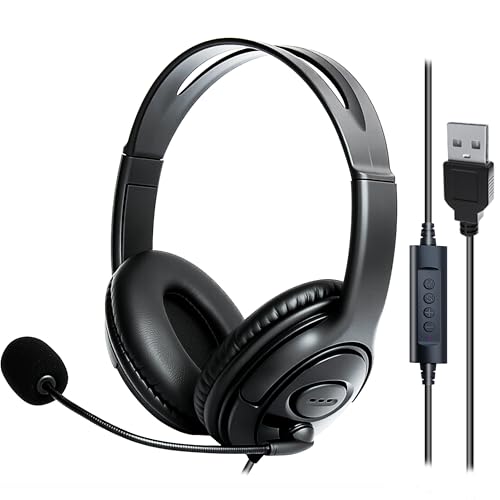
USB Headset with Mic, Computer Wired Headphones (Black Full Ear Cups)

Amazon Basics On Ear Wired Computer Headset with Adjustable Microphone

LEVN USB Headset with Noise Canceling Microphone

Razer Kraken V4 X Wired USB-C & Type A Gaming Headset

Lenovo USB-A Wired Stereo Headset, 140g Lightweight
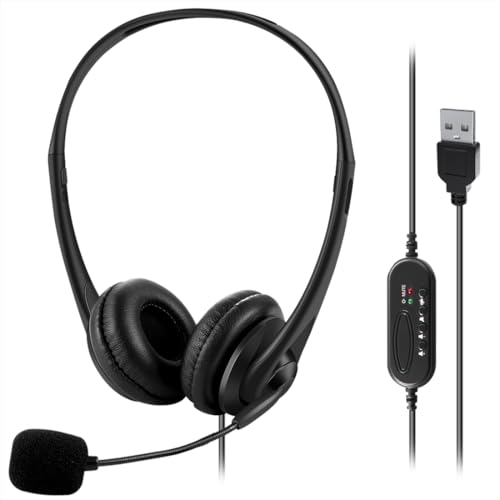
Computer USB Headset with Mic (Black Slender)

Qirvaten USB Computer Headset with Clear Chat Microphone

Logitech H390 Wired Headset, USB-A, Black

Logitech H390 Wired Headset, USB-A, Off-White

Logitech H390 Wired Headset, USB-A, Rose
What Each Pick Brings To The Table
This is the pick for people whose ears give up before their calendar does. The over-ear design fully surrounds each ear rather than pressing on it, which spreads pressure across a wider area and keeps long Teams sessions from turning painful around hour three.
An adjustable headband accommodates different head sizes, so shared households or hot-desk setups can pass one unit between users without a fight. For anyone working from home next to a chatty family or a humming dishwasher, that closed-cup coverage helps mute household background too.
The Practical Payoff
- Fully enclosing ear cushions block office chatter and kitchen noise instead of just sitting on top of your ears.
- The padded headband adjusts smoothly, so you can dial in a fit that survives an eight-hour shift.
- Single USB connection means no separate audio jacks to fumble with on laptops that dropped them years ago.
Things To Consider
- Closed over-ear cups trap warmth, which some owners find noticeable during summer afternoons without air conditioning.
Who It Suits Best
Call-center agents and work-from-home professionals who log back-to-back meetings and prioritize comfort over flashy extras.
A Better Fit Elsewhere
Shoppers who want a lighter on-ear feel should look at the Logitech H390, which trades full enclosure for a slimmer profile.
Not everyone needs a headset built for eight-hour shifts, and this one knows it. The compact on-ear shape folds flat, slips into a backpack pocket, and costs less than most lunch runs, which makes it an easy second headset for travel or a spare drawer.
The connection story is its quiet superpower: you get a standard 3.5mm port plus an in-line control module with a USB-A connector, so older desktops and newer laptops are both covered. One thing worth knowing up front, on-ear pads can feel snug during the first week until they soften to your ears.
What Stands Out
- Foldable frame packs down small enough to live in a laptop bag between classes or trips.
- Dual connectivity covers machines with only a headphone jack and machines with only USB ports.
- In-line controls keep volume adjustments off your screen and out of your meeting software.
Worth Noting
- The on-ear fit presses pads directly against your ears, and several owners report a break-in period of a week or two before comfort settles in.
- Small and medium sizing may feel tight on larger heads.
Made For
Students, casual callers, and commuters who want a cheap, packable backup rather than an all-day workstation headset.
Reach For A Different Pick When
Full-day wearers will be happier with the 321Wasay full ear cup model at number one, since its surrounding cushions distribute pressure far better.
Where the Amazon Basics leans on price, the LEVN leans on your voice being the only thing callers hear. Its rotatable boom microphone uses noise-canceling pickup tuned for speech, which matters enormously when a partner takes a call two rooms away or traffic rolls past your window.
The company positions this squarely at remote workers, call centers, and open offices, and the spec sheet backs that framing with HD-oriented audio processing aimed at call clarity rather than bass-heavy music playback. You may find music sounds merely fine here, but voices land crisp, and that’s the trade most buyers of this category actually want.
Bright Spots
- Noise-canceling mic filters keyboard clatter and household commotion so colleagues hear you, not your living room.
- The rotatable boom swings to whichever side suits your desk layout and mouse hand.
- Speech-first tuning keeps voices clear through long video conferences without listener fatigue.
Potential Drawbacks
- Audio tuning favors calls over media, so audiophiles streaming music all day may want the Razer further down this list.
Right Fit For
Customer support reps and remote employees whose reputation lives and dies on how clearly they come through on calls.
Swap It Out When
Gamers who need positional audio should jump to the Razer Kraken V4 X, whose driver design targets immersive game sound instead.
Every other headset here treats audio as a means to an end; the Kraken V4 X treats it as the point. Razer’s TriForce 40mm drivers split highs, mids, and lows into separate zones inside each driver, so footsteps, dialogue, and explosions stay distinct instead of smearing into mud.
The retractable HyperClear cardioid mic deserves special mention. Cardioid describes a heart-shaped pickup pattern that captures sound in front while rejecting what’s beside and behind it, meaning less chair creak and keyboard spam reaching your squad. Tuck the boom away when the session ends and it simply disappears.
What Makes Sense
- TriForce driver architecture separates frequency ranges for cleaner game and media listening than single-driver designs manage.
- Retractable cardioid mic pulls voice forward and pushes room noise back.
- Dual USB-C and USB-A connectors span modern laptops, desktops, and consoles alike.
Small Caveats
- Gaming headsets run bulkier than office models, so bag space and head weight deserve a thought before ordering.
- Razer’s software ecosystem adds setup steps that plain plug-and-play office headsets skip entirely.
Feature Snapshot
Who Will Love This
PC and console gamers who want one headset that handles ranked matches by night and Monday standups by morning.
Another Choice May Suit
Purely office-focused users will find the Lenovo headset below lighter, quieter-looking, and better matched to conference-room norms.
At 140 grams, roughly the weight of a deck of cards, this Lenovo disappears on your head in a way heavier headsets never quite manage. That figure alone explains why it appeals to anyone whose badge says “in meetings” from nine to five.
The clever bit is maintenance economics. Replaceable earcups mean a worn pad becomes a small parts order instead of a whole new headset, something none of the budget picks here offer. Add AI-powered noise canceling managed through a companion app and a double-sided boom mic, and it reads like hardware designed by someone who has actually sat through corporate life.
A Strong Showing
- 140g chassis keeps neck and temple strain low across marathon meeting days.
- Replaceable earcups extend usable life and cut long-term ownership cost.
- App-driven AI noise canceling adapts filtering beyond fixed hardware-only designs.
- In-line mute gives instant privacy without hunting through call software menus.
Less Ideal Details
- The AI features depend on the companion app, which adds a setup step and won’t appeal to plug-and-play purists.
Core Details
Who Should Grab It
Corporate professionals living in Zoom and Microsoft Teams who value lightness and long-term serviceability over gaming flair.
Where A Sibling Pick Shines
Anyone wanting richer media sound alongside calls gets noticeably more from the Razer Kraken V4 X reviewed above.
Same brand as our first pick, opposite philosophy. Where the full ear cup model wraps your ears entirely, this Slender variant trims the silhouette down for people who dislike the enclosed feeling or who share a desk where bulky cups catch on monitor arms.
The microphone follows a unidirectional pattern, a term meaning it listens mainly from one direction, yours. Paired with a rotatable boom, it aims at your mouth and largely ignores the printer chattering behind you. In our view, this is the sensible middle path in the 321Wasay pair for anyone torn between isolation and awareness.
Noteworthy Benefits
- Unidirectional mic zeroes in on your voice and tunes out background commotion.
- Rotatable boom adapts to left- or right-side preference without fuss.
- Slimmer profile stays comfortable for glasses wearers who find full cups press frames into their temples.
Points To Note
- Less ear coverage means less passive noise blocking, so loud households may bleed into your focus.
- Slender padding generally wears faster than thick over-ear cushions, so treat the pads gently when storing.
Best Suited To
Glasses wearers and shared-space workers who want clear call pickup without the sealed-in sensation of full ear cups.
Consider Something Else When
Noisy environments call for the fuller isolation of the 321Wasay Black Full Ear Cups model at the top of this list.
Some headsets try to do everything; this one does the basics cleanly and stops there. Plug it in, position the flexible boom, adjust the headband, done. There’s no app, no pairing ritual, nothing to learn, which is exactly why it suits first-time headset owners and kids heading into online classes.
The controls live on the cord itself, giving you volume up and down plus mute within easy reach of your hand. Compared to the LEVN earlier in this roundup, you’re trading some polish for simplicity and a lower entry point, and for webinar attendees and tutoring sessions, that trade usually lands well.
Practical Advantages
- Noise-reducing mic picks up speech clearly for webinars, Skype calls, and virtual classrooms.
- Flexible boom lets every user nail talking position regardless of face shape or seating posture.
- Lightweight on-ear build with an adjustable band fits a wide range of head sizes, including younger students.
- Cord-mounted volume and mute controls work even when your hands are nowhere near the keyboard.
A Few Limitations
- No advanced noise-canceling tech here, so very loud rooms still leak through on calls.
The Right Fit
Online learners, tutoring sessions, and households buying their first proper headset for school or occasional business calls.
Look Elsewhere When
Daily professional use justifies stepping up to the Lenovo headset, whose replaceable earcups and app-based canceling hold up better over years.
The H390 has been around long enough that plenty of offices bought it by the dozen, and that track record tells you something no marketing copy can. Plug it into any USB-A port and it works, no drivers, no accounts, no surprises.
The rigid left-sided boom swings down for calls and tucks up out of the way afterward, and in-line buttons handle volume and mute without touching your meeting window. Owners commonly report these lasting for years of daily duty, which puts the total cost of ownership well below cheaper headsets replaced annually.
The Helpful Details
- True plug-and-play USB connection works instantly on Windows and Mac machines alike.
- Noise-canceling mic keeps your voice front and center during video meetings.
- Tuck-away boom keeps the mic out of sight and safe when calls end.
- Fine-tuned digital drivers handle music and video respectably between meetings.
Honest Caveats
- The fixed left-side mic placement won’t suit right-side preference, unlike the swappable booms on the LEVN or the 321Wasay models.
- On-ear pads can collect skin oils over time and benefit from occasional gentle cleaning.
Key Specs
Whose Shelf It Belongs On
Anyone outfitting a home office or small team with a known quantity that just works, day after day.
Skip It When
You need dual analog-plus-USB flexibility, in which case the Amazon Basics foldable at number two covers both port types.
This is the same proven H390 formula as the black version above, dressed in a soft off-white that blends into bright, minimalist desk setups instead of sitting there like a chunk of electronics. Functionally, nothing changes: plug-and-play USB-A, noise-canceling mic, tuck-away boom, in-line volume and mute.
Choosing between the two comes down purely to aesthetics and, honestly, practicality. Light-colored plastics show grime sooner, so dark desks with coffee nearby might favor the black variant. Everyone else gets identical performance with a calmer visual footprint.
Strong Points
- Identical reliable internals to the classic black H390, including the noise-canceling boom mic.
- Off-white finish suits Scandinavian-style desks and bright home studios.
- In-line controls keep mute within reflexive reach during awkward moments.
Things To Weigh Up
- Light plastic tends to reveal dust, fingerprints, and makeup transfer faster than darker finishes, so plan on periodic wipe-downs.
Perfect Match For
Design-conscious remote workers who want dependable meeting audio that doesn’t visually shout from a tidy workspace.
Another Choice May Suit
Heavy coffee drinkers and dusty environments will thank themselves for picking the black H390 instead.
Closing out the trio is the rose edition, and it’s the boldest look of the three by a distance. Underneath the blush-toned shell sits the exact same headset: USB-A plug-and-play, noise-canceling left boom, in-line mute, and those fine-tuned digital drivers.
There’s a genuine case for color beyond vanity. In shared flats, co-working spaces, or family desks where three identical black headsets breed confusion, a distinct shade ends the “which one is mine” argument permanently. Small thing, real payoff.
A Few Strong Suits
- Rose finish doubles as an easy identifier among multiple headsets in one household.
- Same trusted H390 platform with plug-and-play USB-A convenience.
- Retractable-position boom keeps calls tidy and storage compact.
Where It May Fall Short
- Colored finishes can be harder to match with replacement parts later in the headset’s life, per common owner reports.
The Numbers That Matter
Who Should Grab It
Style-minded students and remote workers who want proven H390 reliability wrapped in something less ordinary.
Where Another Pick Suits Better
Maximum-comfort seekers logging eight-hour days should step back up to the 321Wasay full ear cup headset at number one.
Choosing A Usb Headset With Mic That Fits Your Day
Match The Wearing Style To Your Hours
Over-ear cups surround the ear and spread pressure outward, which pays off across shifts longer than four hours. On-ear pads rest directly on the ear, staying cooler and lighter but pressing harder per square inch. Glasses wearers often prefer on-ear or slender designs because full cups push frames into the temple.
Think honestly about your longest typical day, not your average one. A headset that feels fine for a one-hour call can become a genuine problem by hour six.
Understand What The Microphone Actually Does
“Noise-canceling” on a boom mic usually means directional pickup rather than electronic filtering. Unidirectional and cardioid patterns capture sound from the front and reject the sides, which handles keyboard clatter well. App-based AI canceling goes further by processing the signal digitally, at the cost of extra software.
Count Your Ports Before You Order
Modern ultrabooks ship USB-C only, while many desktop towers retain USB-A. A few picks here, like the Amazon Basics foldable, offer both analog and USB paths. Buying for the machine you own today plus the one you’ll likely own next year saves a return trip later.
Key Considerations Across These Picks
Traps First Timers Fall Into
The most common mistake is buying on microphone hype alone and ignoring wearing style, then discovering closed cups turn your ears into radiators by mid-afternoon. Another frequent slip is overlooking pad replacement: sealed proprietary earcups mean a flattened cushion retires the whole unit, whereas the Lenovo’s swap-in design keeps it alive.
The Case For Spending Up
Higher-tier models buy you three things: replaceable parts, smarter signal processing, and multi-format connectivity. The Razer’s TriForce drivers and the Lenovo’s app-driven canceling deliver measurable clarity gains that basic models can’t match. Frequent callers recoup that difference quickly in reduced fatigue.
Frequently Asked Questions
Do USB headsets work on both Windows and Mac?
Yes, virtually all USB headsets use standard drivers already built into both operating systems. Plug in, select the device in your sound settings, and you’re set.
Is a wired headset better than wireless for calls?
Wired units never run out of battery and avoid wireless interference, which matters for all-day availability. Wireless wins on freedom of movement, so the answer depends on how far you roam from your desk.
Will a noise-canceling microphone block all background noise?
No, it reduces consistent background sound like fans and keyboards but won’t erase sudden loud noises completely. Directional mics help most when positioned close to your mouth.
How long do wired USB headsets typically last?
Well-built models like the Logitech H390 commonly serve several years of daily use. Cable strain near the connector is usually the first failure point, so avoid sharp bends.
Can I use a USB headset with a gaming console?
Many consoles accept USB audio, and the Razer Kraken V4 X explicitly supports USB-C and Type-A connections. Check your specific console’s USB audio support before assuming compatibility.
Wrap Up
Your ideal headset comes down to honest self-assessment: how many hours you wear it, how noisy your surroundings are, and whether your machine speaks USB-A, USB-C, or analog. The 321Wasay full ear cup model anchors the comfort end, the Lenovo serves professionals who think in years not months, and the Razer carries gamers. Match the tool to the routine and every call gets a little easier.
