


Anyone who spends hours on video meetings knows the frustration of a laptop mic that picks up every keyboard clack and kitchen clatter. A dedicated headset solves that, and the right one disappears on your head while your voice comes through clean on the other end. This roundup covers ten wired and wireless options that handle calls, classes, and call-center shifts without fuss. Some cost very little, some are built for all-day professional use, and each one earns its place for a specific kind of desk.
The Leading Options At A Glance

Amazon Basics Wired Computer Headset with Adjustable Mic

LEVN USB Headset with Noise Canceling Microphone

Acer OHR690 Wireless Bluetooth Headset for Work

Logitech H390 Wired Headset, USB-A (Off-White)

Logitech H390 Wired Headset, USB-A (Rose)

Logitech H391 Wired Headset, USB-C (Graphite)

Lenovo USB-A Wired Stereo Headset Gen 2

Poly Blackwire 5220 Stereo USB-C Headset
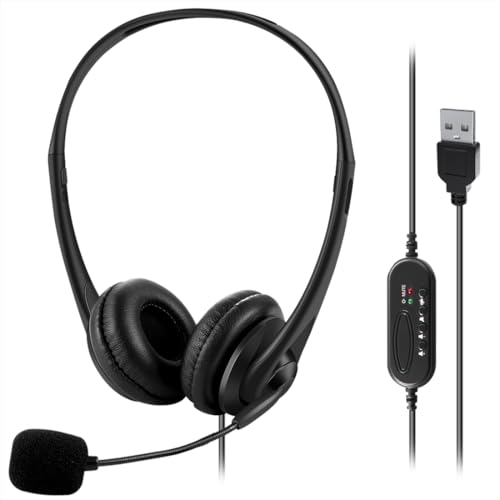
321Wasay USB Headset with Mic (Black Slender)
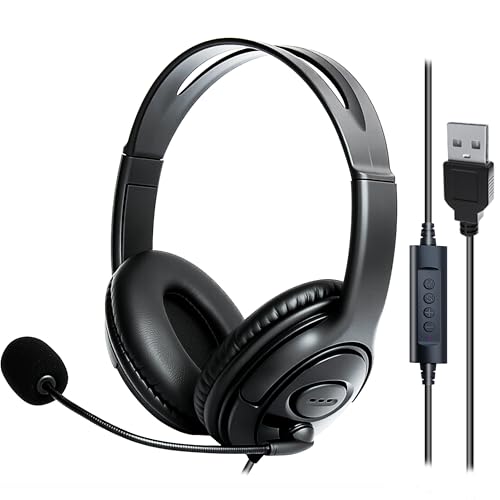
321Wasay USB Headset with Mic (Full Ear Cups)
More Details On Our Top Picks
This is the spare-key headset you keep in a drawer for when a guest needs to join a call or a student logs into class from the kitchen table. It connects through either a 3.5mm jack or an in-line control with a USB-A plug, so older desktops and newer laptops both work.
The foldable frame makes storage genuinely practical; it slips into a backpack pocket without eating space. Expect clear, no-frills sound rather than anything tuned for music, which is exactly what most calls need anyway.
What Works In Its Favor
- Dual 3.5mm and USB-A connectivity covers nearly any computer you own
- Folds flat for drawer or bag storage between uses
- Adjustable microphone lets you position the boom close to your mouth for clearer pickup
- On-ear size suits smaller heads and shared family computers
Things To Consider
- The compact on-ear fit can feel snug at first; owners commonly report a break-in period of a week or two of regular wear
- No padded travel case included, so folding it carefully matters for longevity
Who Should Grab It
Students, occasional callers, and households wanting a dependable backup headset that costs little and stores easily.
Another Choice May Suit
Heavy daily callers will get more mileage from the LEVN USB Headset’s dedicated noise-canceling microphone and office-grade build.
Open-plan offices and busy homes share one problem: background noise bleeding into every call. The LEVN attacks that directly with a rotatable boom microphone built around noise-canceling technology, meaning the mic filters ambient sound before your voice reaches the caller.
It plugs in over USB-A with no drivers to install, so switching desks or borrowing a colleague’s machine takes seconds. Compared with the foldable Amazon Basics pick above, this one trades portability for a more settled, workstation-oriented build that stays put through long shifts.
A Few Highlights
- Noise-canceling mic keeps keyboard and household sounds out of calls
- Rotatable boom swings out of the way during breaks
- Simple USB-A plug-and-play setup works on PCs and laptops alike
- Designed around work-from-home and call-center routines, not casual listening
Worth Noting
- Wired only, so cable management matters; route the cord away from your chair wheel to avoid strain on the connector
- Tuning leans toward voice clarity, so music playback may sound flat compared with entertainment headphones
Key Specs
Made For
Customer support agents, recruiters, and anyone taking back-to-back calls in a space they don’t fully control.
Look Elsewhere When
Cord-free flexibility matters more than mic filtering; the Acer OHR690 wireless headset later in this list handles roaming around the house far better.
Weight is where this Acer earns its keep. At roughly 2.56 ounces, it sits among the lightest headsets in its class, and that difference becomes obvious around hour four of a shift when heavier cups start pressing on your jaw.
The ear cups tilt up to eight degrees to follow the natural shape of your ears, a small ergonomic detail that spreads pressure instead of concentrating it. The manufacturer reports extensive head-form evaluation behind the design, and the result reads as a headset made for people who forget they’re wearing one.
A Few Strong Suits
- Extremely light frame reduces neck and jaw fatigue over long days
- Self-adjusting tilt on the ear cups improves fit across different head shapes
- Bluetooth freedom lets you stand, stretch, or grab coffee mid-call
- Ergonomic shaping suits extended daily wear better than rigid designs
Small Caveats
- Wireless means charging becomes part of your routine; forgetting overnight can ground you mid-morning
- Bluetooth pairing adds a setup step that plug-and-play wired models like the Logitech H390 skip entirely
Who Will Love This
Remote professionals logging six-plus hour meeting days who want to move freely without sacrificing call clarity.
Swap It Out When
Your desk setup never changes and you’d rather never charge anything; the wired Lenovo Gen 2 below removes batteries from the equation.
Some products earn their reputation quietly, and the H390 is that kind of headset: plug it into a USB-A port, wait two seconds, and it just works. There’s no software, no pairing, no fiddling with audio settings on most systems.
The noise-canceling mic sits on a rigid left-side boom that tucks up against the headband when you’re done talking, keeping it out of coffee’s reach. In-line controls put volume and mute within thumb’s reach, which matters more than it sounds once you’re muting yourself a dozen times per meeting. Fine-tuned drivers handle meeting audio and casual music without complaint.
What Makes Sense
- True plug-and-play USB-A setup works instantly on virtually any computer
- In-line volume and mute controls avoid fumbling through app menus mid-call
- Tuckable rigid boom protects the mic when not in use
- Noise-canceling mic delivers consistent voice clarity for video meetings
Points To Keep In Mind
- USB-A only, which rules out direct connection to newer port-less laptops without a hub
- The off-white finish shows handling marks more readily than darker colorways; a quick wipe-down now and then keeps it presentable on camera
Feature Snapshot
Right Fit For
Home-office workers and students who value set-and-forget reliability over extra features.
Reach For A Different Pick When
Your laptop has abandoned USB-A entirely; the Logitech H391 offers the same experience natively over USB-C.
Everything said about the off-white H390 applies here, because underneath the paint it’s the same proven headset: USB-A plug-and-play, noise-canceling boom mic, in-line mute and volume. The difference is purely visual, and that’s precisely its appeal.
The rose finish softens the usual tech-black look, which suits bright home offices, content creators on camera, and anyone whose desk doubles as their aesthetic. Functionally nothing changes, so your choice comes down entirely to which color belongs in your workspace.
The Practical Payoff
- Identical reliable internals to the standard H390, just in a warmer shade
- Looks composed on video calls and streaming setups
- Keeps the handy in-line mute and volume controls
Details To Watch
- Limited availability compared with the black and off-white versions, so stock can come and go
- Light-colored ear cushions may show makeup or dye transfer over months of wear; gentle cleaning preserves the finish
The Right Fit
Creators, students, and remote workers who want their gear to match a curated desk without paying for performance they won’t notice.
Skip It When
You need a USB-C native connection for a modern thin-and-light laptop; step down the list to the graphite H391 instead.
Plenty of laptops sold today have dropped the old rectangular USB-A port, and that’s the gap the H391 fills. You get the same plug-and-play simplicity as the H390 reviewed earlier, but through a USB-C connector that plugs straight into modern machines without adapters.
Logitech also worked recycled plastic into the construction, a quiet detail worth knowing if sustainability factors into what you buy. Audio tuning mirrors its sibling: fine-tuned drivers for meetings and music, plus in-line controls so muting never means hunting through a menu.
Real Benefits
- Native USB-C connection suits current laptops, tablets, and phones with matching ports
- Noise-canceling mic keeps calls crisp in imperfect rooms
- Post-consumer recycled plastic in the build lightens its footprint
- In-line controls make mute and volume adjustments instant
Factors To Consider
- Older desktop towers with only USB-A ports will need an adapter, reversing the convenience
- As a newer release, long-term durability reporting is thinner than for the well-established H390 line
Whose Shelf It Belongs On
Owners of recent ultrabooks and USB-C-first setups who want zero dongles in their life.
Not Your Match When
Your main machine is an older desktop; stick with the off-white H390 above and save the adapter hassle.
Most budget headsets treat noise reduction as a hardware afterthought; Lenovo takes a software route here, applying AI-based noise canceling through a companion app. The practical effect for Teams and Zoom users is a voice signal that arrives cleaner than the raw mic would manage alone.
At 140 grams the frame stays light, yet it packs details pricier sets often skip: replaceable earcups, a double-sided boom option, and in-line controls with a dedicated mute. Replaceable cushions matter more than they sound, since worn pads are usually what retire a headset first.
What Helps Most
- AI noise canceling via app filters distractions beyond basic hardware mics
- Replaceable earcups extend usable life significantly
- Double-sided boom mic accommodates left- or right-side preference
- 140g weight keeps pressure low through full workdays
- In-line mute integrates cleanly with Teams and Zoom workflows
Less Ideal Details
- Best noise performance depends on installing and running the companion app, an extra step some users skip
- USB-A connection again leaves USB-C-only laptops needing a dongle
Core Details
Who It Suits Best
Corporate users living in Teams and Zoom who want software-enhanced clarity and serviceable parts.
Where Another Pick Suits Better
People juggling multiple devices throughout the day will find the Poly Blackwire 5220’s adapter kit more flexible.
This is the headset you buy when your day spans a company laptop, a personal phone, and whatever the hotel room provides. The Blackwire 5220 ships with three ways to connect: USB-C, a 3.5mm plug, and a USB-C-to-A adapter, covering essentially every device you’ll meet.
Poly, formerly Plantronics, has decades of enterprise telephony behind this line, and it shows in the details. Soft conforming ear cushions provide passive noise isolation, meaning the padding itself blocks room sound rather than electronics doing the work, while a precisely tuned microphone keeps your side of the conversation sharp. Ergonomics lean toward marathon sessions rather than quick calls.
What It Does Well
- Three-in-one connectivity kit adapts to laptops, phones, and legacy ports
- Passive isolation from dense ear cushions quiets open offices naturally
- Precisely tuned mic reflects serious business-audio engineering
- Ergonomic build holds up through full working days
Trade Offs To Consider
- Carrying three connectors means keeping track of small parts; a small pouch habit saves lost adapters
- Enterprise pedigree puts it above casual budgets, so light users pay for capability they may rarely touch
Quick Facts
Built With In Mind
Consultants, hybrid employees, and IT teams standardizing on one headset that survives any desk assignment.
Consider Something Else When
Budget is the deciding factor and calls happen at one fixed computer; the Amazon Basics headset earlier covers that scenario at a fraction of the investment.
The “slender” in this model’s name refers to its lighter, less bulky profile, and that shapes who it fits best. Smaller heads, kids doing online classes, and anyone who finds full-size cans oppressive will appreciate the reduced clamp.
The microphone is unidirectional, a term worth knowing: it listens mainly from one direction, straight toward your mouth, and largely ignores everything else. Paired with a rotatable boom, that gives surprisingly focused voice pickup for the price bracket. Next to the full-cup sibling below, this version trades some passive quiet for a less claustrophobic feel.
Practical Pluses
- Unidirectional rotatable mic zeroes in on your voice
- Slender frame suits smaller heads and lighter wear preferences
- Simple USB connection gets you calling in seconds
Honest Caveats
- Thinner ear coverage lets more household noise reach your ears than over-ear designs manage
- As a lesser-known brand, expect more variability in long-term hinge and cable durability compared with Logitech or Lenovo units
Perfect Match For
Students and smaller-framed users wanting focused mic pickup without heavy over-ear bulk.
Where A Sibling Pick Shines
Working adults in genuinely loud rooms should choose the 321Wasay Full Ear Cups variant instead for its stronger physical isolation.
Where the slender variant trims bulk, this one goes the other way with fully enclosing over-ear cups and noise-canceling cushioning that wraps around your ears. Physical coverage does real work here: office chatter and household clatter fade before any electronics get involved.
An adjustable headband spans a wide range of head sizes, so shared family use or hot-desking isn’t a problem. Call-center agents and work-from-home professionals putting in consecutive hours are clearly the target audience, and the design choices follow that brief closely.
Where It Helps
- Over-ear cushions block surrounding noise passively, aiding concentration
- Adjustable headband accommodates varied head sizes comfortably
- Enclosing design supports hours of focused meeting time
- Plug-and-play USB keeps setup effortless across PCs and laptops
Potential Sticking Points
- Full cups trap warmth; owners in warm climates commonly report sweaty ears during summer sessions
- Larger frame takes up more drawer and bag space than the slender version
Product At A Glance
Who Should Grab It
Call-center staff and remote workers in busy households who need maximum physical quiet on a modest budget.
Swap It Out When
All-day comfort outweighs isolation; the featherweight Acer OHR690 wears noticeably easier across very long shifts.
Choosing Between These Usb Headsets With Microphone
Match The Connection To Your Machine
Start with your actual ports. Older desktops and many office towers still speak USB-A, while recent laptops increasingly offer only USB-C. Buying the wrong connector means living with an adapter dangling off your machine, which adds wobble and one more thing to lose. The 3.5mm option on models like the Amazon Basics headset remains handy for phones and tablets too.
Mic Quality Beats Speaker Quality
On a call headset, the microphone matters more than the drivers. Look for noise-canceling or unidirectional booms, which filter keyboard clicks, pets, and street noise before your colleagues hear them. Software-assisted options such as Lenovo’s app-based AI canceling push clarity further, though they require installation. Passive isolation in the earcups helps your own focus, but it doesn’t affect how you sound to others.
Weight And Wear Time
A headset feels fine for thirty minutes and punishing by hour four. Anything under roughly 150 grams tends to disappear on your head, and features like tilting earcups or replaceable pads extend comfortable wear considerably. Plan for breaks regardless; even the lightest frames benefit from a five-minute rest each couple of hours.
Think About How You Move
Tethered to one desk, wired wins on simplicity and never needing a charge. Roaming between rooms, grabbing coffee mid-call, or splitting attention across devices makes Bluetooth worth the battery routine. Honest self-assessment here prevents regret more than any spec sheet.
Key Considerations Across These Picks
Traps First Timers Fall Into
The classic mistake is buying for music quality when the job is voice. A bass-heavy pair of headphones often makes voices muddy on calls. Second trap: ignoring port types and discovering your shiny new headset doesn’t fit the laptop you actually own. Check first, order second.
When Paying More Pays Off
Higher-tier models earn their price through multi-device connectivity, replaceable parts, and refined ergonomics rather than louder sound. Anyone logging four-plus calling hours daily recovers that premium quickly in comfort and fewer replacements. Occasional callers genuinely don’t need it.
Frequently Asked Questions
Do USB headsets work on any computer?
Nearly all do, since USB audio uses standard drivers built into Windows, macOS, and ChromeOS. Just confirm the connector matches your available port, or plan for an adapter.
Is a noise-canceling microphone the same as noise-canceling headphones?
No, and the distinction matters. Mic canceling cleans the audio other people hear from you, while headphone isolation reduces what you hear around you.
How long do wired headsets typically last?
With reasonable care, two to five years is common, with cables and ear pads being the usual failure points. Models with replaceable earcups stretch that lifespan notably.
Can I use these headsets for gaming?
Yes, most handle game chat and voice platforms without issue. Dedicated gaming headsets add surround effects, but for competitive communication a solid call headset performs admirably.
Do I need special software for these headsets?
Almost none require it; plug in and select them as your audio device. Exceptions exist, like Lenovo’s AI noise canceling app, which unlocks extra mic filtering beyond the hardware default.
Wrap Up
The right choice comes down to honest accounting of your day. Fixed desk and simple needs point toward the Logitech H390 or the budget-friendly Amazon Basics. Marathon callers should weigh the Acer OHR690’s featherlight build or the Lenovo’s replaceable parts. Multi-device roamers get real value from the Poly Blackwire 5220’s three-connector kit. Match the tool to the routine and any of these ten will serve you well.
