


A good headset is the difference between a meeting where you’re heard and one where you keep repeating yourself. Whether you take calls from a home office, a shared desk, or a gaming chair at midnight, the right USB headset handles voice clarity, comfort, and noise without fuss. This list covers ten options spanning budget wired basics to wireless workhorses, so you can match one to how you actually spend your day.
The Shortlist At A Glance

Amazon Basics On Ear Wired Computer Headset (Black)

Razer Kraken V4 X Wired Gaming Headset (Black)

Yealink BH71 Pro Bluetooth Headset

Acer OHR690 Wireless Headset for Work
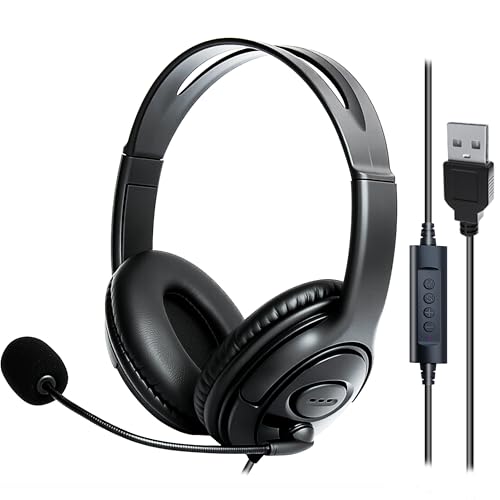
321Wasay USB Headset with Mic (Full Ear Cups)

Lenovo USB-A Wired Stereo Headset Gen 2

Razer Kraken V3 X Wired USB Gaming Headset
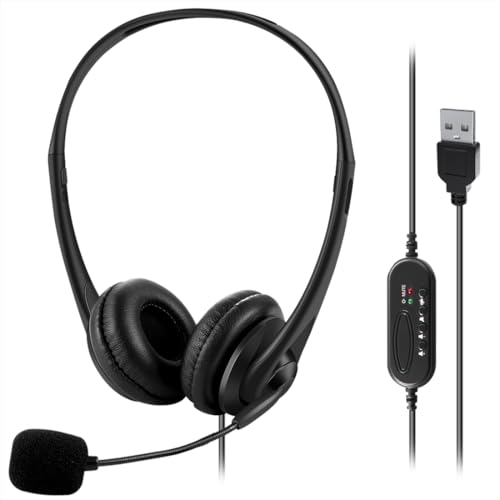
321Wasay USB Headset with Mic (Black Slender)

MARVO H8921 Gaming Headset with Mic

Acpanore USB Headset with Microphone
What Each Pick Brings To The Table
This is the no-drama option of the group. You plug it in, adjust the boom mic, and join your call, with a choice between a 3.5mm connection or an in-line control that runs off a USB-A port.
The foldable frame makes it easy to toss into a backpack between classes or coworking days. The on-ear fit sits snugly at first, which some owners say softens after a week or two of regular wear, so plan short sessions early on.
Strong Points
- Dual connectivity lets you use one headset across laptops, tablets, and older desktops
- Folds flat, so it survives being stuffed into a bag daily
- Adjustable microphone positions close to your mouth for clearer call audio
- Small and medium sizing suits narrower heads better than bulky over-ear designs
Things To Consider
- The on-ear pressure can feel tight during the first stretch of ownership; frequent cleaning of the ear pads helps them break in evenly
- No active noise handling, so loud rooms will bleed through
Who It Suits Best
Students and occasional callers who want a cheap, packable headset that just works.
Reach For A Different Pick When
You need serious isolation for a noisy household, where the 321Wasay Full Ear Cups model covers more of the ear.
Razer’s entry-level Kraken keeps things simple: one cable, two connector choices, and sound tuned by a driver split into three parts. That Triforce design separates highs, mids, and lows onto their own zones, which matters when you’re trying to hear footsteps under gunfire instead of one muddy blend.
The HyperClear cardioid mic retracts into the ear cup when you switch to music or solo play. Compared with the Amazon Basics pick above, this one is clearly built around games first, calls second.
Key Advantages
- Three-part 40mm drivers give cleaner separation than single-piece designs in this bracket
- Cardioid pickup favors your voice over keyboard clatter
- Retractable mic disappears neatly when not needed
- USB-C and Type-A support covers modern laptops and older towers alike
Worth Noting
- Wired only, so cable management becomes part of your desk routine
Quick Facts
Built With In Mind
Console and PC gamers who want tuned audio and a decent mic without paying flagship money.
Swap It Out When
You want RGB flair and virtual surround too, which pushes you toward the Kraken V3 X below.
Everything else on this list pins you to a desk. The BH71 Pro doesn’t, pairing over Bluetooth 5.3 to your phone or through the included BT51 dongle to a laptop, with both devices connected at once. That multipoint trick means a call can roll from your computer to your cell mid-conversation without fumbling.
Yealink rates talk time at roughly ten hours per charge, enough to cover a full working day for most people. The single-ear hook design leaves one ear open, which suits warehouse floors and open offices but won’t appeal if you like immersive music while working.
Standout Benefits
- Connects to two devices simultaneously, so switching sources takes seconds
- Pairs stably at ranges up to about 130 feet, letting you pace while you talk
- Teams certification means call controls behave predictably in meetings
- Noise-canceling mic keeps your side of the line clean
- Roughly ten hours of rated talk time per charge
Points To Note
- Single-ear listening sacrifices stereo depth for awareness
- An extra dongle and charging habit add small maintenance steps compared with plug-and-play wired picks
Details At A Glance
Who Will Love This
Consultants, sales staff, and anyone juggling a phone and a laptop through the day.
A Better Fit Elsewhere
Desk-bound remote workers who never leave their chair get more value from the Lenovo Gen 2’s lower weight and replaceable parts.
Weight is the story here. At roughly 2.56 ounces, the OHR690 sits among the lightest headsets in its class, and after hour five of a support shift, that difference is what your neck notices. The ear cups tilt up to eight degrees either way, letting them settle against your ears rather than pressing flat against them.
It’s built squarely for calls and meetings rather than music, which is honest positioning. Where the Yealink BH71 Pro trades comfort for roaming range, this one stays put and disappears on your head.
Practical Pluses
- Featherlight build reduces the end-of-day neck fatigue heavy headsets cause
- Self-adjusting tilted cups spread pressure more evenly across long sessions
- Ergonomic shaping was refined across many head-form evaluations, which shows in the fit
- Wireless freedom keeps your desk free of another cable
Honest Caveats
- Lightweight construction usually means lighter-duty materials, so gentle storage pays off over time
- Tuned for voice, not bass-heavy media
Feature Snapshot
The Right Fit
Customer service agents and teachers running back-to-back video classes who value comfort above everything.
Consider Something Else When
You roam far from your computer during calls, a scenario where the Yealink BH71 Pro’s long range earns its keep.
Kids in the next room, a partner on their own calls, a dog with opinions: this is the headset built for that house. Its fully enclosing over-ear cushions wrap around each ear, physically blocking household noise before it reaches you, something the slim on-ear models here simply can’t do.
The adjustable headband spans a wide range of head sizes, so sharing between family members isn’t a fight. Setup is the easiest kind: one USB plug into any PC or laptop and you’re in the meeting.
Where It Delivers
- Enclosing cushions muffle background distractions, keeping focus through long meetings
- One-cable USB setup works instantly on virtually any computer
- Adjustable band accommodates different users in a shared household
- Designed for multi-hour stretches, suiting call-center-style shifts
Some Limits To Know
- Full ear coverage traps heat, which you may notice in warm rooms
- Larger cups take up more drawer space than slender designs
Right Fit For
Work-from-home professionals and students studying in busy, unpredictable households.
Another Choice May Suit
Minimalists with tight desk space will prefer the 321Wasay Black Slender variant reviewed further down.
Most headsets treat wear items as permanent. Lenovo doesn’t: the earcups on this Gen 2 model are replaceable, which turns a two-year headset into a much longer-term purchase. At 140 grams it’s also genuinely light, sitting comfortably between the featherweight Acer OHR690 and heavier gaming builds.
The double-sided boom mic gives you left or right mounting flexibility, and an app-driven AI noise-canceling mode filters background chatter beyond what basic hardware manages alone. In-line mute puts privacy one click away mid-call.
Where It Helps
- Replaceable earcups extend usable life and cut long-term cost
- App-based AI noise reduction sharpens your voice in shared spaces
- Double-sided boom mounts on whichever side feels natural
- In-line controls include instant mute for surprise interruptions
- 140g frame keeps all-day pressure minimal
Trade Offs To Consider
- AI features depend on installing and maintaining the companion app
- USB-A only, so newer port-only laptops need an adapter
Core Details
Who Should Grab It
Everyday hybrid workers living in Teams and Zoom who want durability and clean voice pickup.
Skip It When
Your machine offers only USB-C ports and you’d rather avoid adapters; the Razer Kraken V4 X handles both natively.
Think of this as the Kraken V4 X with the lights turned on. The Fortnite Edition V3 X adds 7.1 surround sound and Chroma RGB lighting to the same lightweight philosophy, coming in at just 285 grams so marathon sessions don’t weigh on your shoulders.
The bendable HyperClear cardioid mic places its sweet spot right at your mouth, and the three-part Triforce drivers tune highs and lows independently for brighter, punchier game audio. Availability has been spotty at times, so checking current stock makes sense before committing.
Real-World Strengths
- Virtual 7.1 surround improves positional awareness in competitive shooters
- 285g build keeps long raids and ranked grinds comfortable
- Chroma RGB syncs your setup’s look without adding bulk
- Bendable mic arm dials in exact mouth placement
Less Ideal Details
- Lighting requires Razer software running in the background
- Listings have shown limited availability windows, worth confirming before planning around it
Who It Suits Best
PC gamers who want surround sound and personality lighting in a headset light enough to forget.
Look Elsewhere When
You’d rather skip software entirely; the simpler MARVO H8921 delivers surround on plug-and-play terms.
The Slender variant trims the bulk of its full-cup sibling into a slimmer frame that slides into a laptop sleeve without argument. It keeps the useful bits: a unidirectional, rotatable boom mic that captures your voice while rejecting the room around it.
That rotating arm is quietly practical. Swing it down for a call, flip it up out of the way for coffee breaks, and the mic doubles as a visible mute indicator to people nearby. For commuters who take meetings from cafés or shared desks, this shape makes more sense than anything bulky.
Real Benefits
- Unidirectional mic isolates speech from office or street noise
- Rotatable boom flips up for quick muting between conversations
- Slim profile packs easily alongside a laptop
- Comfort-focused padding supports longer wearing stretches
Small Caveats
- Thinner padding generally means less passive noise blocking than the Full Ear Cups version
- Slender frames can feel less planted during movement
Whose Shelf It Belongs On
Mobile professionals and students who carry their headset between locations daily.
Not Your Match When
Your priority is maximum isolation at a fixed desk; the 321Wasay Full Ear Cups model does that job better.
First gaming headset territory starts here. The H8921 brings virtual surround sound, flowing RGB lighting, and a braided cable to PC and PlayStation setups at a price that leaves room in the budget for actual games.
The braided cord is the detail worth appreciating: fabric sheathing resists the fraying and kinking that kills cheaper plastic cables within months. Over-ear cushioning targets long-session comfort, and the noise-canceling mic keeps squad chat intelligible even with a fan humming nearby.
Reasons It Performs
- Virtual surround reveals subtle in-game cues for sharper positional play
- Braided cable stands up to desk snags and repeated coiling
- RGB lighting adds visual energy to a starter setup
- Over-ear design supports extended play sessions
- Works across PC and PS4/PS5 consoles
Factors To Weigh
- RGB and surround tuning rarely match Razer’s polish at this tier
- Cable length may need managing on smaller desks
Spec Overview
Made For
Beginner and budget-conscious gamers building their first proper PC or console setup.
Where A Sibling Pick Shines
Gamers wanting refined driver tuning and a retractable mic will find the Razer Kraken V4 X worth the step up.
Call centers burn through headsets, and this one is shaped by that reality. The unibody construction pairs with enhanced noise-reduction technology on the mic, aiming for consistent professional sound across hours of back-to-back calls on Zoom, Skype, or Teams.
There’s nothing flashy here, and that’s the point. One USB connection, predictable behavior, and a build meant to be picked up and used all day without ceremony. Compared with the feature-packed Razer options earlier in this list, it trades extras for reliability, which is exactly the right trade for high-volume phone work.
A Few Strong Suits
- Noise-reducing mic keeps your voice clear in busy surroundings
- Single USB plug works across office PCs and home laptops
- Unibody design avoids the creaky joints cheaper headsets develop
- Suited to long consecutive call blocks without fussing
Things To Weigh Up
- Plain styling won’t excite gamers or streamers
- As a newer listing, long-term durability reports are still thin
Who Will Love This
Support agents, recruiters, and telemarketers whose entire workday happens on calls.
Another Choice May Suit
Workers who also want replaceable parts and app-based noise control should look at the Lenovo Gen 2 instead.
Choosing Between These Headsets Without Regret
Match The Connection To Your Desk
Wired USB models like the Lenovo Gen 2 and the 321Wasay pair never need charging and never drop mid-sentence, which is why offices still standardize on them. Wireless picks such as the Yealink BH71 Pro buy you movement, at the cost of a charging routine. Count how far you actually roam during calls before paying for freedom you won’t use.
Weight Decides Long Shifts
Anything over roughly 250 grams gets noticeable after a few hours, and the difference compounds across a forty-hour week. The Acer OHR690 at 2.56 ounces and the Lenovo at 140 grams exist precisely because sore necks are real. Heavy gaming builds earn their mass through bigger drivers and sturdier frames, so accept the trade knowingly.
Mic Quality Beats Speaker Quality For Calls
Your colleagues hear your microphone far more than you hear theirs. Cardioid patterns, like the HyperClear mics on both Razer models, favor sound arriving from directly ahead, cutting keyboard and room noise. Unidirectional booms on the 321Wasay and Acpanore units do similar work at friendlier prices.
Key Considerations Across These Picks
Wrong Turns To Avoid
The most common mistake is buying for music quality when the headset’s real job is voice. Another is ignoring connector types; a USB-C-only laptop paired with a USB-A headset means adapters forever. Check your ports first, then your priorities.
When Paying More Pays Off
Higher-tier models justify their cost through driver engineering, replaceable parts, and software refinement. The jump from a budget wired unit to something like the Kraken V4 X buys cleaner sound separation and a better mic, not just branding. Spend up when you wear a headset daily; save when calls are occasional.
Frequently Asked Questions
Do USB headsets work on any computer?
Any machine with a matching USB port will recognize them as standard audio devices. Older USB-A headsets need an adapter on newer port-limited laptops.
Are wireless headsets worse for calls than wired ones?
Modern Bluetooth versions have narrowed the gap considerably. Latency is negligible for voice, though battery management becomes part of your routine.
What does a cardioid microphone actually do?
It records sound primarily from the front of the mic capsule. That directionality rejects keyboard typing and room echo behind or beside you.
Can one headset serve both gaming and work meetings?
Yes, several picks here cross over well. Gaming models bring richer sound, while work-focused units prioritize mic clarity and lightweight comfort.
How long should a decent USB headset last?
With normal care, two to four years is a reasonable expectation. Replaceable parts, like the Lenovo’s swappable earcups, extend that timeline meaningfully.
Closing Thoughts
The right choice comes down to honest self-assessment: where you work, how long you wear it, and whether you ever leave the desk. Desk-bound callers get the most from the Lenovo Gen 2 or the 321Wasay Full Ear Cups, rovers should lean toward the Yealink BH71 Pro, and gamers have two solid Razer paths plus the MARVO budget route. Whichever fits your day, a headset that matches it will quietly improve every conversation you have.
