


You want a Windows gaming laptop that fits your routine, not just a spec sheet. Some of these picks suit light gaming, schoolwork, and everyday use, while others are built for smoother frame rates, faster multitasking, and less waiting around between launches. The right match depends on how demanding your games are, how often you travel, and whether you need the machine to handle work after the match ends.
Quick Look At The Shortlist

ASUS Lightweight 15.5″ Full HD Laptop, Star Black

HP Victus 15 Gaming Laptop, RTX 3050, i5-12500H

HP Victus 15.6″ 144Hz Gaming Laptop, Ryzen 7, RTX 4050

HP Victus 15.6″ Full HD 144Hz Gaming Laptop, i5-12450H

NIAKUN Laptop Computer, 15.6 Inch, Core i7, 16GB RAM
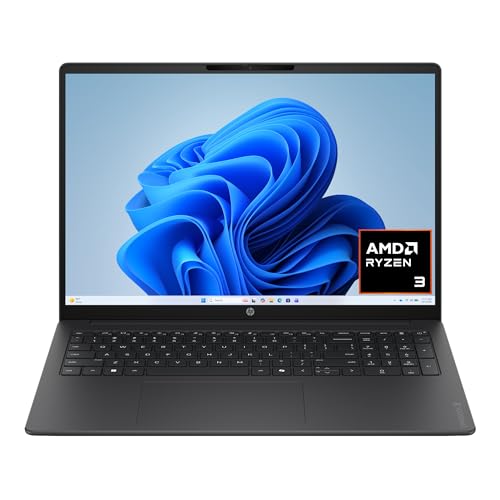
HP OmniBook 3 16 inch Laptop PC, 2K Touchscreen

16″ Laptop Computer Core i5, 16GB RAM, 512GB SSD
More Details On Our Top Picks
This ASUS keeps things plain and light, which makes sense for commuting, classwork, and the kind of gaming that stays modest. A 15.5-inch Full HD screen gives you enough space for everyday use, while the backlit keyboard helps in dim rooms, though the Intel Celeron chip and 4GB of LPDDR4 memory set a clear ceiling for heavier titles.
The 128GB SSD should feel quicker than older hard-drive setups, but storage will feel tight once you add games, updates, and media. Compared with the Victus models later in the list, this one is more about getting you into Windows on a simple budget than pushing frame rates.
Strong Points
- Lightweight build suits travel and shared desks.
- Full HD resolution keeps text and menus crisp enough for daily work.
- Backlit keys help during late study sessions.
Things To Consider
- 4GB memory limits smooth multitasking.
- 128GB storage fills quickly once you install a few larger games.
- Best suited to lighter titles and everyday tasks, not demanding play.
Feature Snapshot
Who It Suits Best
Students and casual shoppers who want an affordable Windows machine for light use will get the most from it.
Where A Sibling Pick Shines
HP Victus 15 Gaming Laptop, RTX 3050, i5-12500H suits you better once games and multitasking matter more.
The combination here feels much more gaming-focused than the ASUS model above, especially with the GeForce RTX 3050 and 12th Gen Core i5-12500H doing the heavy lifting. That pairing makes sense for you if you split time between current games, Discord, and a dozen browser tabs, while 8GB of RAM and a 512GB SSD keep the base setup sensible.
The backlit keyboard and Full HD display round out a familiar gaming-laptop layout, and the enhanced cooling design should help during long sessions in a dorm or bedroom desk setup. The honest read is that this still sits in the mainstream lane, so you should expect competent play rather than top-tier headroom.
Highlights
- RTX 3050 graphics give you a clearer step up from entry-level machines.
- 8GB memory and 512GB storage handle everyday gaming routines well.
- Cooling-focused design is useful during longer sessions.
Worth Noting
- 8GB RAM is workable, though heavier multitasking can feel cramped.
- Storage is decent, but large libraries still need regular housekeeping.
- Better for mainstream gaming than maximum visual settings.
Technical Sheet
Who Will Love This
You fit this model best if you want a straightforward gaming laptop for school, home, or a first serious setup.
Another Choice May Suit
HP Victus 15.6″ 144Hz Gaming Laptop, Ryzen 7, RTX 4050 suits you better for faster visuals and stronger graphics headroom.
This is the most clearly performance-led Victus in the group, and the 144Hz display matters just as much as the RTX 4050. A 144Hz panel refreshes more often than a standard 60Hz screen, so motion tends to look smoother in fast games, while 16GB of DDR5 memory gives the system more room for modern multitasking.
Compared with the RTX 3050 models, this one is the better fit for you if you want longer relevance and less compromise in demanding titles. The included mouse pad is a small bonus, though the larger point is that the Ryzen 7 and 512GB SSD make this feel more ready for heavier use right away.
Upsides
- 144Hz display gives fast motion a smoother feel.
- RTX 4050 and Ryzen 7 are a stronger match for demanding games.
- 16GB DDR5 memory supports heavier multitasking and launch-heavy routines.
- Windows 11 Home keeps the setup familiar.
Points To Note
- More powerful parts usually bring more heat and fan activity under load.
- 512GB storage is useful, though big installs can crowd it sooner than expected.
Core Details
Built With In Mind
Competitive players and gamers who want a stronger graphics cushion will get the most from this pick.
Look Elsewhere When
ASUS Lightweight 15.5″ Full HD Laptop, Star Black makes more sense for basic portability and very light use.
This Victus lands in a useful middle ground, with 16GB of memory, a 512GB PCIe SSD, and Wi‑Fi 6 giving it a tidy everyday foundation. PCIe SSD means the storage connects over a fast internal interface, so boot times and app launches tend to feel brisk, and the Full HD 144Hz display helps motion stay smooth without pushing the price tier too far up.
Compared with the RTX 4050 model, the graphics side is a step down, but the total package still fits a desk setup that needs to handle classwork, streaming, and gaming in one place. You may find the blue finish a bit more understated than the Mica Silver option above, which is fine for a home office or shared room.
Best Bits
- 16GB memory gives you more breathing room than 8GB systems.
- Wi-Fi 6 helps in busier homes with lots of connected devices.
- 144Hz panel is a welcome fit for fast-action titles.
- PCIe SSD supports quick access to files and games.
Areas To Watch
- RTX 3050 graphics sit below the newer RTX 4050 option.
- Blue chassis styling is a matter of taste, not function.
Who Should Grab It
You fit this laptop well if you want a balanced Windows gaming machine for home use and don’t need the strongest graphics tier.
Skip It When
HP Victus 15.6″ 144Hz Gaming Laptop, Ryzen 7, RTX 4050 is the better call for more demanding play.
This NIAKUN model reads more like a general-purpose Windows notebook than a true gaming build, so the value comes from its roomy 16GB memory and 512GB SSD. A 15.6-inch screen keeps the layout familiar, and Windows 11 Pro may appeal to you if you also need work-oriented features alongside casual play.
The Core i7-7600U can still handle everyday browsing, office work, and lighter games, though the older chip class makes this a less obvious match for demanding modern titles. In practice, it suits a student desk or small home office better than a setup built around long gaming sessions.
Reasons To Buy
- 16GB memory is roomy for everyday multitasking.
- 512GB SSD gives you practical storage without relying on slow drives.
- Windows 11 Pro suits work-first routines.
- Backlit keyboard helps in low light.
Small Caveats
- Older processor design limits gaming ambition.
- Office-style focus may fit work better than play.
Quick Facts
Whose Shelf It Belongs On
You suit this pick best if you want a work-friendly notebook with only light gaming on the side.
Reach For A Different Pick When
HP Victus 15 Gaming Laptop, RTX 3050, i5-12500H is the cleaner fit for stronger gaming priority.
The 16-inch 2K touchscreen gives this OmniBook a more polished feel than the plain 1080p models above. 2K means a higher-than-Full-HD resolution, so text and images can look a little finer, and that larger 16:10 layout suits side-by-side windows during school tasks or relaxed play.
Its Ryzen 3, Radeon 610M graphics, 8GB of RAM, and 256GB SSD point toward casual use rather than serious gaming, and that honesty is part of the appeal. Compared with the Victus machines, this one makes more sense for someone who values screen size and touch input over stronger graphics muscle.
Bright Spots
- Large 16-inch panel gives you room to spread out.
- Touchscreen support adds a more flexible way to interact.
- 16:10 layout helps with documents and web pages.
- Mica Silver finish keeps the look calm and modern.
Honest Caveats
- Ryzen 3 and Radeon 610M suit casual gaming more than demanding titles.
- 256GB storage needs attention if you install larger games.
The Right Fit
You fit this model best if your day mixes light gaming with note-taking, browsing, and touch-friendly navigation.
Where Another Pick Suits Better
HP Victus 15.6″ 144Hz Gaming Laptop, Ryzen 7, RTX 4050 is the stronger move for serious game performance.
This HYPERSTRIX machine leans hard into desk-friendly utility, with a 16-inch 1920 x 1200 display, Bluetooth 5.0, Wi-Fi, HDMI, RJ45, USB-A, and a backlit keyboard. The 16:10 screen format gives you a little extra vertical room, which helps with long pages and multitasking, while the ports make it easier to keep accessories and wired networking in place.
The Core i5 stays in the mainstream lane, so this is better for light gaming, office work, and general home use than for demanding AAA play. Compared with the OmniBook 3, this one feels more practical for a fixed desk, especially when a wired connection and external display matter.
Standout Traits
- 16:10 display gives you more vertical working space.
- RJ45 and HDMI are useful for a desk setup.
- 16GB RAM and 512GB SSD create a comfortable everyday base.
- Backlit keyboard helps in low-light rooms.
Room For Improvement
- Core i5 class performance keeps it in the lighter gaming tier.
- The larger body is less appealing for frequent carrying.
Perfect Match For
You fit this pick best if your gaming laptop spends most of its life on a desk.
Swap It Out When
HP Victus 15.6″ 144Hz Gaming Laptop, Ryzen 7, RTX 4050 is the better fit once gaming speed matters more.
What Matters Most Before Choosing Windows Laptops For Gaming
Match Graphics To The Games You Play
Dedicated graphics help far more than a faster-feeling name on the box. RTX 3050 and RTX 4050 options are the clearest gaming choices here, while the lighter notebooks suit casual titles and everyday use.
Memory And Storage Change Daily Comfort
8GB RAM can work, but 16GB feels less cramped once you open a game, a browser, and chat tools at the same time. SSD capacity matters too, because modern game installs and updates fill space faster than many shoppers expect.
Screen Speed And Size Shape The Experience
A 144Hz panel helps motion feel smoother in fast titles, while a 16-inch 16:10 display gives you more room for work and browsing. Smaller, lighter machines can still be useful, but they trade away some comfort and gaming headroom.
A Few Extra Points Worth Keeping In Mind
Common Shopping Slip Ups
A lot of confusion starts with older processor names, because a model can look powerful on paper yet still sit in a light-use tier. Another common miss is buying too little storage, then running out of room after only a few installs.
Where The Extra Money Goes
Higher-tier gaming laptops usually pay for stronger graphics, faster screens, and more memory headroom. That spending makes sense when you want smoother play now and a little more breathing room for the next few game releases.
Frequently Asked Questions
What makes a Windows laptop good for gaming?
A dedicated graphics chip and enough memory matter most. A faster SSD and a smoother display help the experience feel better day to day.
Is 8GB RAM enough for gaming?
It can work for lighter setups and older games. For a more comfortable Windows gaming laptop, 16GB gives you more breathing room.
Do you need a 144Hz screen?
No, but it helps fast motion look smoother. That matters most in action games and competitive play.
Which of these picks suits schoolwork too?
The HP Victus 15 models and the HYPERSTRIX 16-inch laptop balance games with general productivity well. The ASUS and OmniBook 3 lean more toward light use.
Should you choose more storage or a stronger GPU?
A stronger GPU matters more for gaming performance. Extra storage still helps, because large game libraries can fill a drive quickly.
Closing Thoughts
You get the safest gaming-focused choices from the HP Victus models, especially the RTX 4050 version for stronger headroom. The lighter ASUS, NIAKUN, and OmniBook 3 options make more sense when portability, casual play, or mixed use matter more than graphics muscle. Pick the machine that matches your actual game habits, and you’ll feel the difference every day.
